Google Wallet at I/O 2026 and Apple Wallet in iOS 27: Everything Announced and What It Means
Every Google Wallet feature announced at I/O 2026 and every Apple Wallet change announced at WWDC 2026: Create a Pass, Tap to Share, the Poster Generic pass style, four new barcode formats, Featured Actions, Pass Designer and Pass Builder, and what each means for pass issuers.
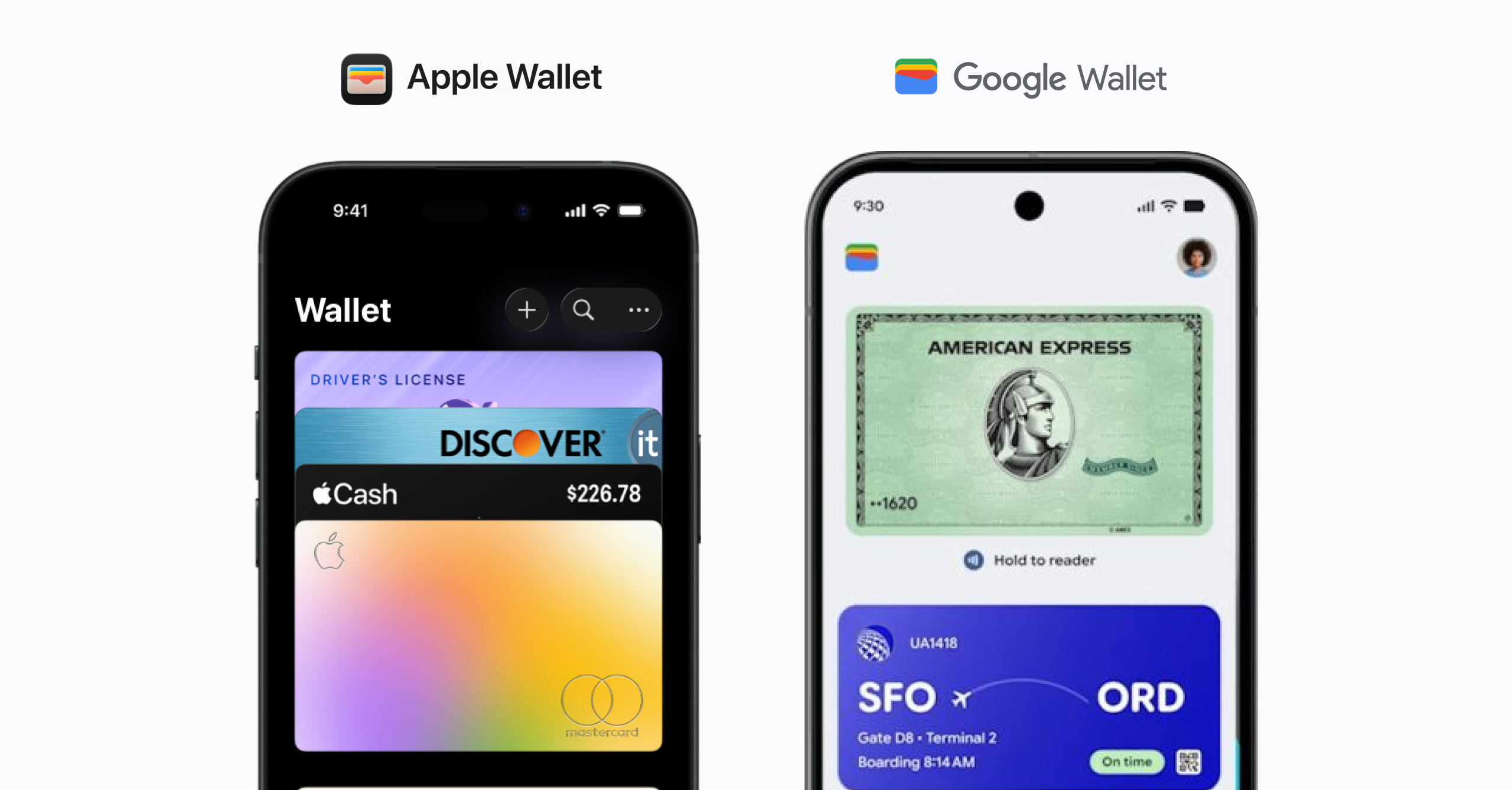
Apple and Google both moved on Wallet within five weeks. On May 22 at I/O 2026 Google previewed a Digital Receipts API, contactless loyalty enrollment, Auto-linked Passes, Live Updates for travel, Cross-device Payment Verification, an Android-wide Wallet redesign, and several smaller features. On June 8 at WWDC Apple previewed iOS 27: Create a Pass shipped quietly in the first developer beta, Tap to Share puts loyalty into the tap-to-pay moment, Apple Cash gained bill splitting, and the “What’s new in Wallet” session delivered the largest issuer-facing PassKit batch since iOS 26, including Apple’s first first-party design and signing tools.
The changes split cleanly along consumer-side and business-side lines, and the signed, server-updatable, branded pass program at the middle is unchanged.
At a glance: every update in this cycle
Google Wallet, announced at I/O 2026 (May 22, 2026):
- Android Wallet app redesign. Two-per-row passes, full-screen live items, searchable “View more” hub. Shipping.
- Live Updates for tickets and flights on lock screen and always-on display. Shipping.
- Digital Receipts API. Retailers push receipts directly into Wallet. Preview, no partners or date.
- Contactless loyalty enrollment. Post-tap-to-pay prompt to join a retailer’s program. Rolling out.
- Auto-linked Passes. Boarding passes installed automatically post check-in. Launch partner: Azul Airlines.
- Inline frequent-flyer signup from a boarding pass. Announced, no date.
- Cross-device Payment Verification. NFC tap plus biometric, alternative to SMS OTP under EU/UK SCA. Announced, no date.
- Digital ID verification expanded to Uber and Intuit TurboTax. Shipping by partner.
- Nearby Passes via Google Maps. The 10-location geofence cap is removed.
- Chrome autofill expands to pull passport, driver’s license, loyalty cards and boarding passes out of Wallet for desktop and iOS forms.
Apple Wallet, announced at WWDC 2026 (June 8, iOS 27 public release around September):
- Create a Pass. Consumer pass authoring from a camera scan or from scratch, three templates (Standard, Membership, Event). In the first developer beta; never shown on stage.
- Tap to Share. Tap your iPhone to a participating merchant’s device at checkout to share loyalty details, contact information, and shipping address, then pay without a second tap.
- Split Bill with Apple Cash. Scan a restaurant receipt with visual intelligence, assign items per person, Apple Cash requests each share with tax and tip. US only, iPhone and Apple Watch.
- Redesigned Apple Pay checkout sheet: swipe between cards, with rewards balances, debit balances, and pay-later options inline.
- Hotel keys gain trip details, activity updates, and in-stay services; the Orders surface gets easier access and richer product detail; new Wallet app icon.
- Poster Generic pass style for issuers: full-bleed artwork behind logo, header, primary, and footer fields. iOS 27+.
- Four new barcode formats in
pass.json: EAN-13, Code 39, Codabar, ITF. - Featured Actions: up to two tappable tiles on any pass style, previously limited to second-generation event tickets.
- Pass Designer (Mac app) and Pass Builder (Swift on Server package with a
buildpassCLI): first-party tools for designing, personalizing, and signing passes.
Google’s I/O 2026 Wallet batch, in detail
Wallet app redesign (shipping)
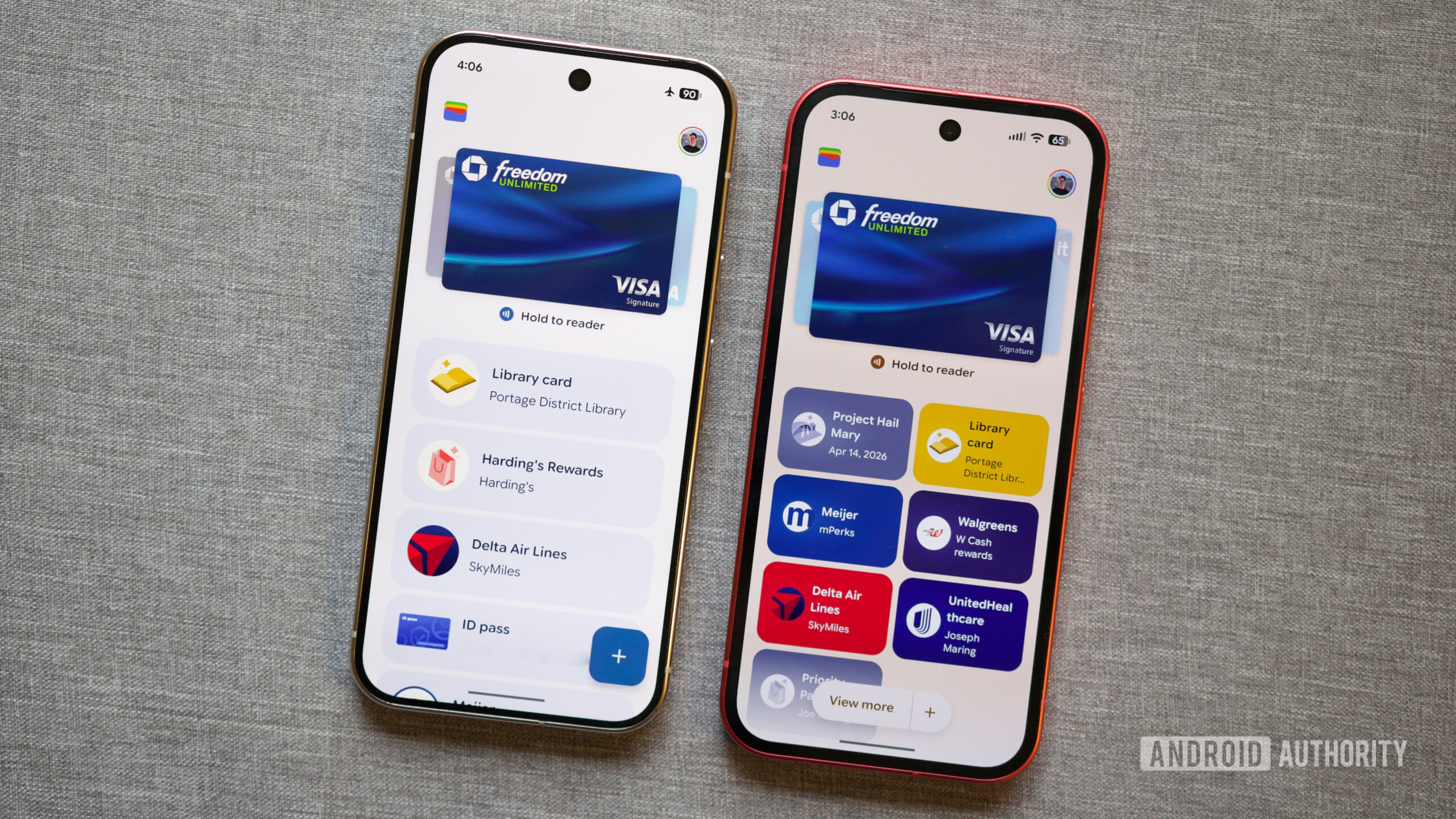
The Android Wallet homepage is restructured around time-sensitivity. Boarding passes and live items render full-screen. Other passes lay out two-per-row, with the option to pin or drag-reorder which ones live on the home view. A searchable “View more” hub holds everything else and exposes transaction details.
For issuers the layout itself doesn’t change the pass payload. A static loyalty card now sits behind the live items in the Wallet UI, so passes that update, push, or surface contextually get the home screen.
Live Updates for tickets and flights (shipping)
Time-sensitive events and flights can post Live Updates that surface on the lock screen and always-on display, in addition to standard Wallet field updates. Apple shipped a comparable Wallet-native mechanism for boarding passes in iOS 26 (September 2025), with United, Delta, and Southwest as launch carriers, bringing the two platforms to rough parity here.
Digital Receipts API (preview)
A dedicated API for retailers to push receipts directly into Wallet at checkout, with launch partners and ship date undisclosed. Once a receipt is in Wallet, attaching a return barcode, a points-earned line, or a follow-up coupon is a smaller step. POS vendors and payment processors will likely intermediate, so small retailers will get this through Square, Toast, Lightspeed and similar before building to it directly.
Contactless loyalty enrollment (rolling out)
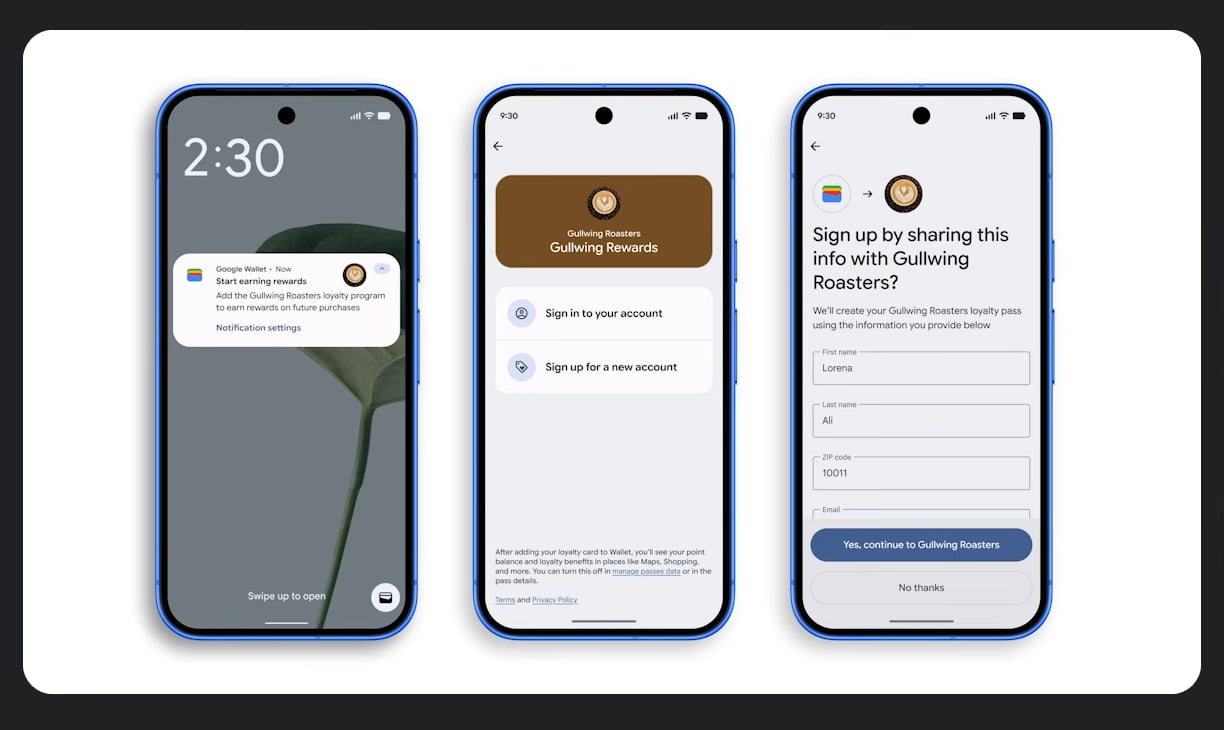
After a tap-to-pay transaction at a participating retailer, the user gets a notification inviting them to join that retailer’s loyalty program if they haven’t already. Accepting creates the Wallet pass.
The acquisition funnel changes; the program does not. The loyalty card, the points logic, the tier rules, the redemption flow, and the design of the pass are all still owned by the retailer. A customer who would never have signed up at the counter now might. Two weeks after I/O, Apple announced its own version of this moment (Tap to Share, below), so the tap-to-pay instant is now a loyalty acquisition surface on both platforms.
Auto-linked Passes: automatic boarding pass syncing (shipping)
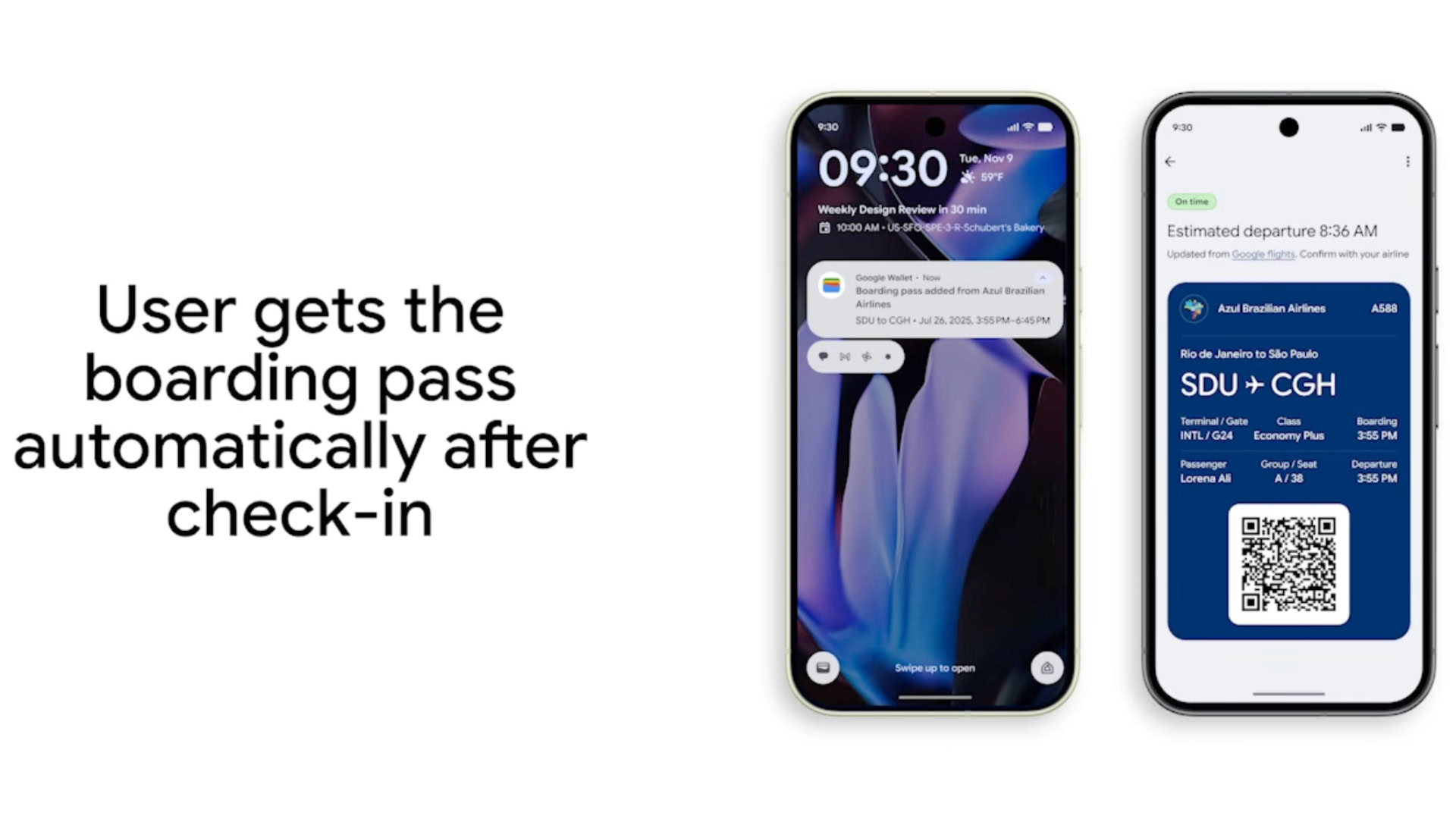
After airline check-in (online, mobile, or at the airport), the boarding pass is pushed into Wallet automatically, with no “Add to Google Wallet” button to find. Google’s reference launch partner is Azul Airlines (Brazil), with broader rollout to follow.
The pattern (operator issues, platform auto-installs) is the part worth tracking. If it works for airlines, ticketing and event partners are the next plausible candidates.
Inline frequent-flyer signup from a boarding pass (announced)
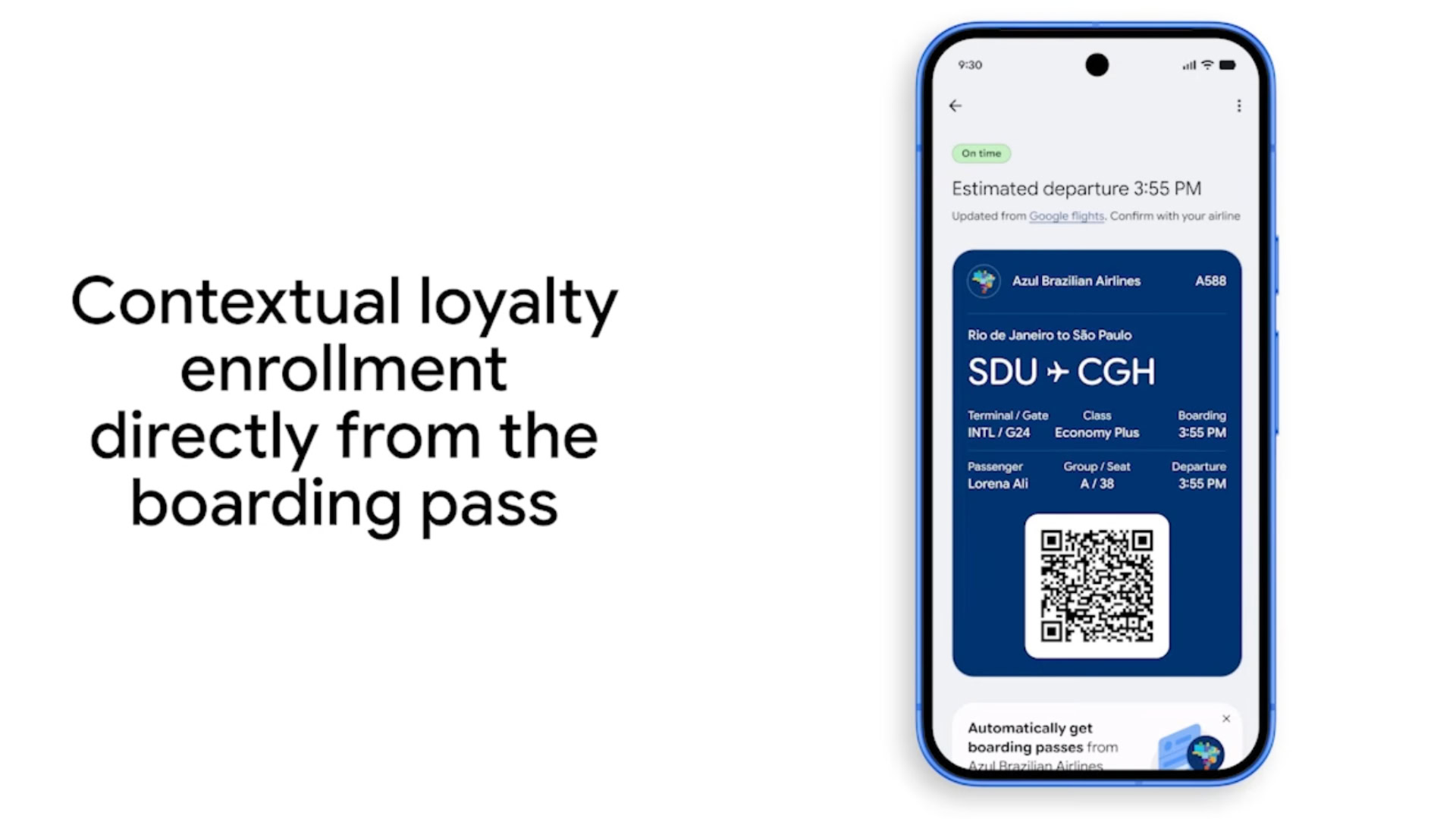
When a boarding pass lands in Wallet, the user will see a prompt to join the airline’s frequent flyer program. Airline-first, no ship date.
Cross-device Payment Verification (announced)
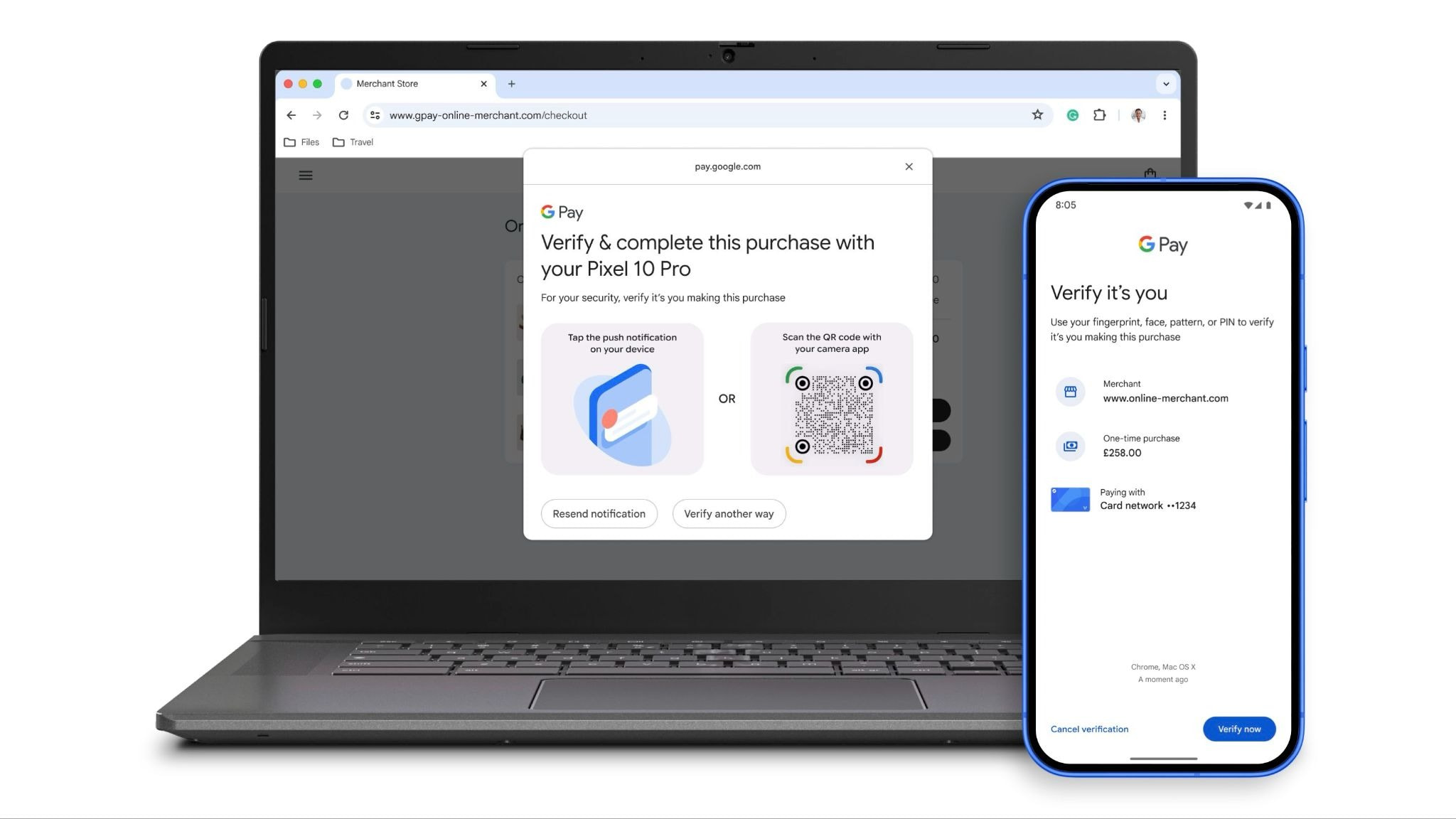
When buying on a desktop browser, the user taps their Android phone to the laptop via NFC and confirms with face, fingerprint, or PIN. Google positions it as an alternative to SMS OTPs for EU/UK Strong Customer Authentication. Launch date not specified.
This sits at the payment-processor layer. For non-payment issuers (loyalty, ticketing, IDs) the direct effect is zero. For businesses taking card-not-present payments through Google Pay, conversion lifts are plausible once it ships broadly.
Digital ID verification expansion (partial)
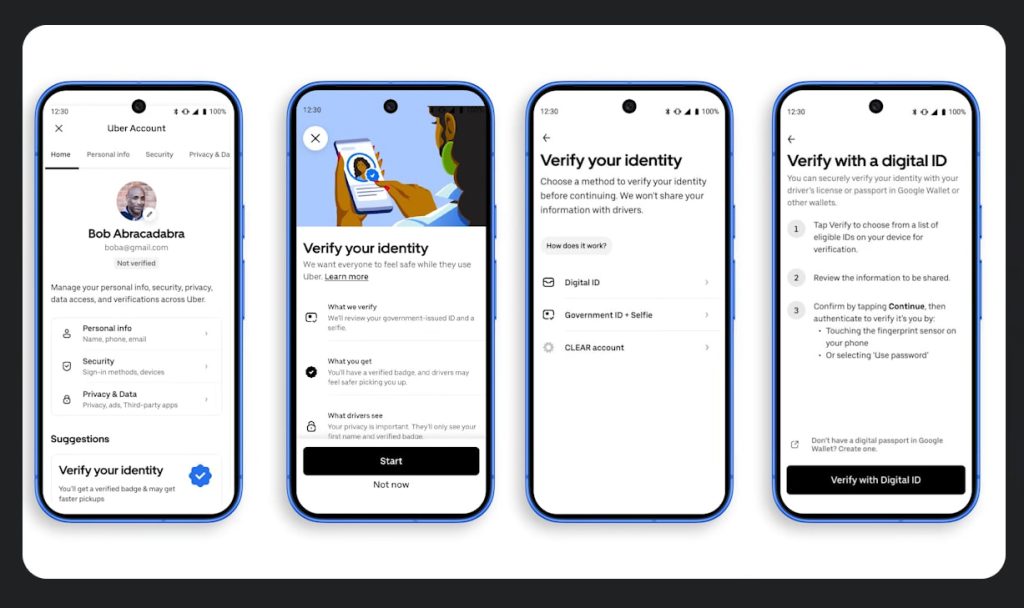
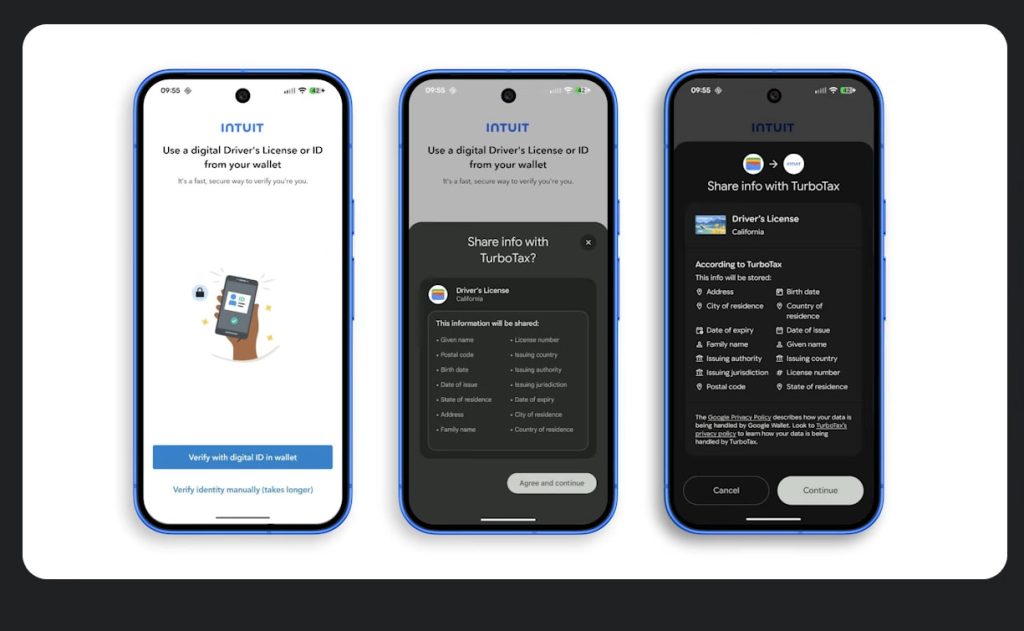
Google Wallet’s digital ID verification lets a user selectively share attributes from a digital ID without handing over the whole document. It extended to Uber and Intuit TurboTax. Rollout is partner-by-partner. The mDL credentials are state-issued in the US, so geographic reach is gated on DMV cooperation.
Nearby Passes via Maps, plus Chrome autofill expansion
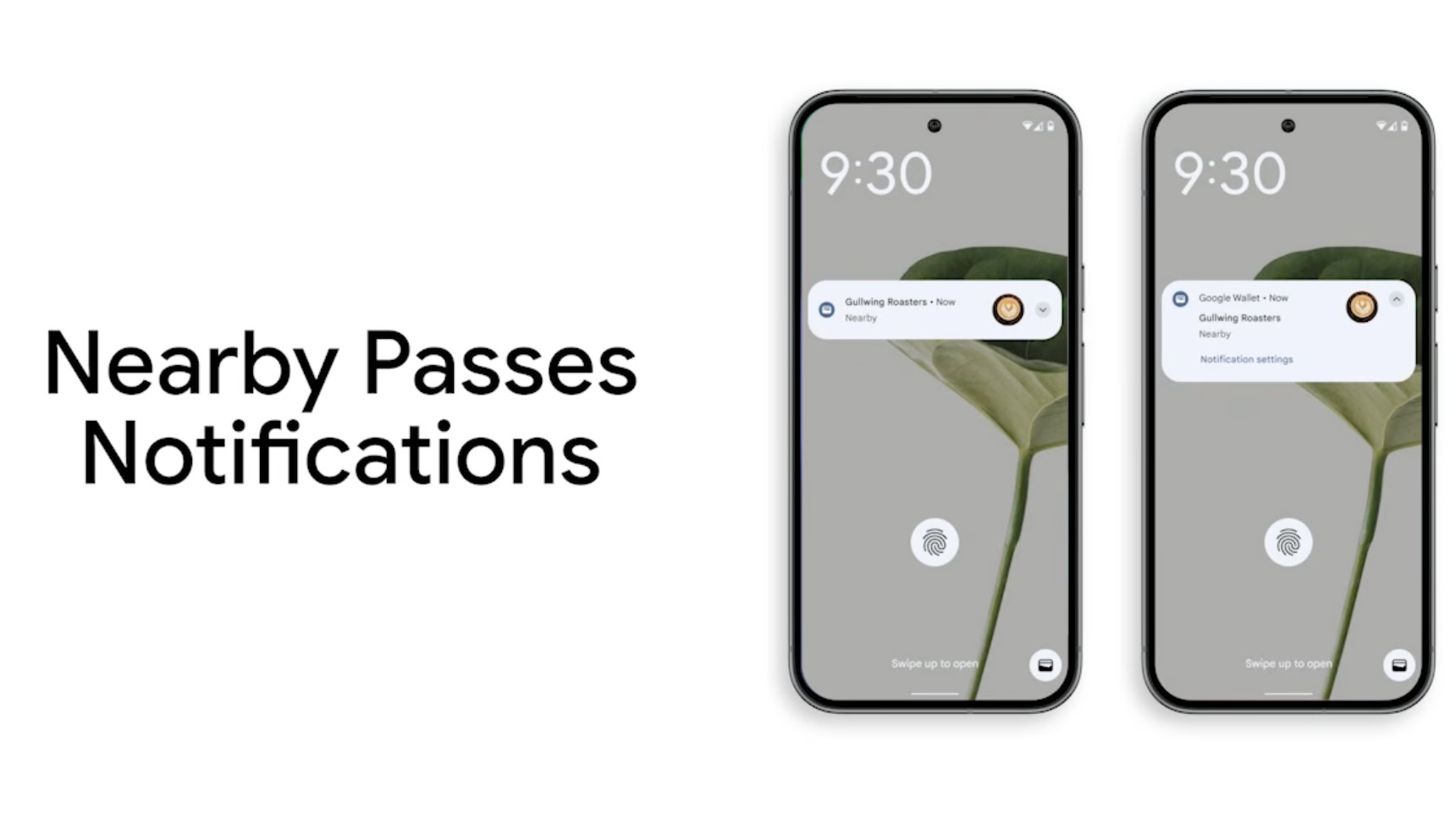
Nearby Passes now uses Google Maps for store identification, removing the historical 10-location cap on per-pass geofences. Store networks that previously truncated to 10 can now expose all of them. Separately, Chrome autofill can now pull out of Wallet (passport, driver’s license, booking confirmations, loyalty cards, boarding passes) to fill forms on desktop and iOS.
Apple’s iOS 27 Wallet: what WWDC announced
The June 8 keynote previewed iOS 27. The first developer beta is out, the public beta follows in July, and the public release is expected in September. The Wallet batch splits into consumer features shown in the keynote and the issuer-side PassKit work detailed in the “What’s new in Wallet” session (WWDC26 session 209).
Create a Pass: shipped quietly in the developer beta
Apple never announced Create a Pass on stage. It shipped in the first iOS 27 developer beta behind the “+” button in Wallet, the same menu where credit cards get added.
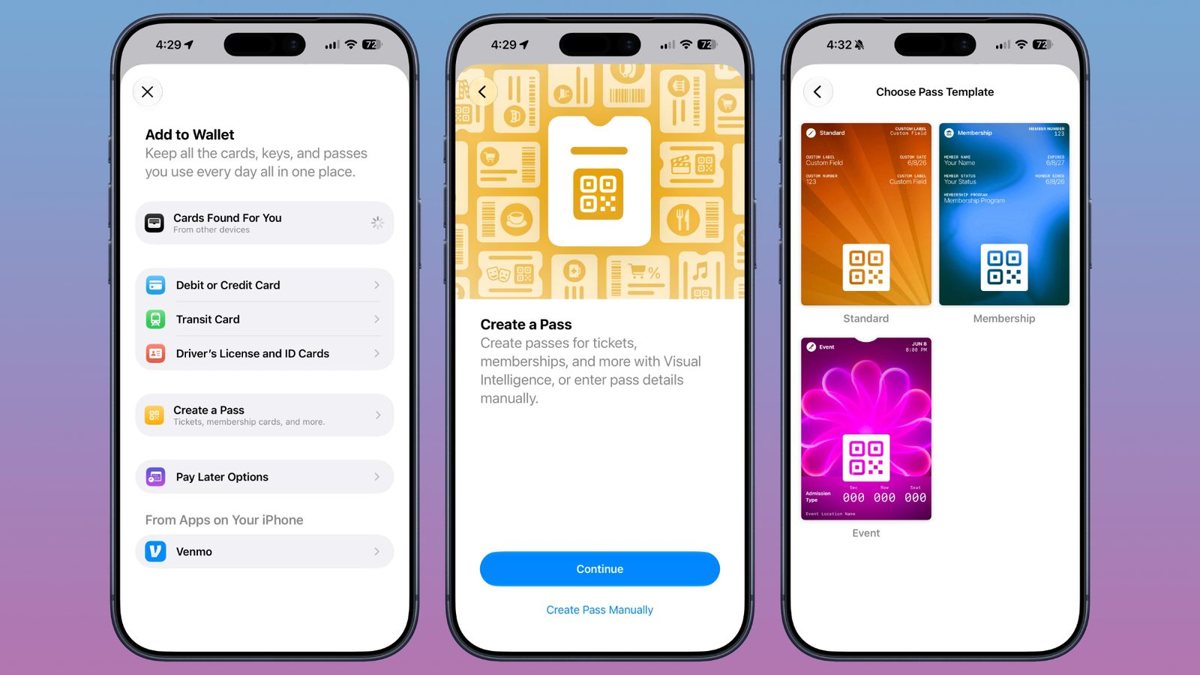
Two flows. Scan a physical pass, ticket, gift card, or QR code with the camera and visual intelligence builds a Wallet pass around it, or build from scratch with three templates: Standard, Membership, and Event. Customization covers images, colors, style, and text fields. Apple’s framing: Wallet becomes the hub for every pass in your life, including the ones whose issuers never built a native integration.
Nothing at WWDC attached a developer API to Create a Pass. A user-created pass has no signing, no server updates, no push, and no cross-device issuance; the issuer-facing work Apple shipped this cycle lives in PassKit and the new tools, covered below.
What Create a Pass actually does
It is the largest expansion of who can put a pass in Apple Wallet since Wallet shipped. Until now every Apple Wallet pass came from a signed certificate held by an issuer (directly or via a vendor); after iOS 27, the consumer can issue to themselves.
A user-created pass is a fundamentally different object from an issuer pass:
| Capability | Issuer pass (.pkpass signed) |
Create a Pass (consumer) |
|---|---|---|
| Updates after install (server push) | Yes, APNs to every device with the pass | No |
| Brand design at scale (logo, strip, color, fields) | Full | User picks from templates |
| Bulk issuance (10,000 cards in one job) | Yes | No, one device, one pass |
| Cross-device parity (issued once, on every iPhone) | Yes | No, lives on the device that created it |
| Server-side state (points, balance, expiry, tier) | Yes | No |
| APNs lock-screen notification when balance changes | Yes | No |
| Geofenced lock-screen surfacing on visit | Yes (issuer controls) | Limited (only what the user typed in) |
| Analytics, revocation, trusted certificate | Yes | No |
A branded membership card that updates when a member upgrades, a stamp card that pushes a banner when a stamp lands, a season ticket whose seat changes when the team moves the user: all untouched by Create a Pass. iOS 27 expands what end users can build themselves without changing what a business pass program needs.
A common counter-framing is “Apple killed the pass-API category.” The more accurate read is that Apple is educating the market about wallet passes at scale, and for free. Every consumer who hand-makes a pass for their gym is one consumer more likely to expect their real loyalty card to push a notification when their points change.
Tap to Share: loyalty enters the checkout tap
The most issuer-relevant consumer feature of the keynote. At a participating merchant, the customer taps their iPhone to the merchant’s device and securely shares information with the store: loyalty and rewards details, email and contact information, shipping address. The customer can watch the basket build in real time, confirm discounts applied, and pay with Apple Pay in the redesigned checkout sheet without tapping again.
This is Apple’s answer to the same moment Google addressed with contactless loyalty enrollment: the physical tap at the counter becomes the place where a loyalty relationship starts or gets exercised, instead of a phone number recited at the register. Participation is merchant-side, so availability will roll out store by store, but the direction on both platforms is identical. A live, native wallet loyalty program is the prerequisite for being part of that moment on either one.
The rest of the consumer batch
Split Bill with Apple Cash. Point the camera at a restaurant receipt, select who ordered what, and Apple Cash calculates each share including tax and tip, then sends payment requests. US only, works from iPhone and Apple Watch.
Redesigned Apple Pay checkout. The payment sheet now supports swiping between cards and surfaces rewards balances, debit account balances, and pay-later options inline at the moment of payment.
Hotel keys as a mini concierge. Room keys in Wallet now carry trip details, activity updates, and access to hotel services for the length of the stay.
Smaller items. The Orders surface (Apple Intelligence order tracking extracted from Mail, shipped in iOS 26) is easier to reach and shows richer product details, and the Wallet app icon is redesigned.
One absence worth noting: Verify with Wallet got no expansion this cycle. The current state (US state IDs since iOS 16.5, web verification since iOS 26, US passports since iOS 26.1) stands. Apple’s AI investment in Wallet went into visual intelligence doing concrete jobs, scanning a card into Create a Pass and parsing a receipt for Split Bill, not an assistant surface inside the app.
What WWDC gave pass issuers
Session 209 is the issuer half of the announcement, and it is the part the consumer coverage skipped. Four items: a new pass style, new barcode formats, an actions API, and first-party tooling.
Poster Generic: a full-bleed pass style
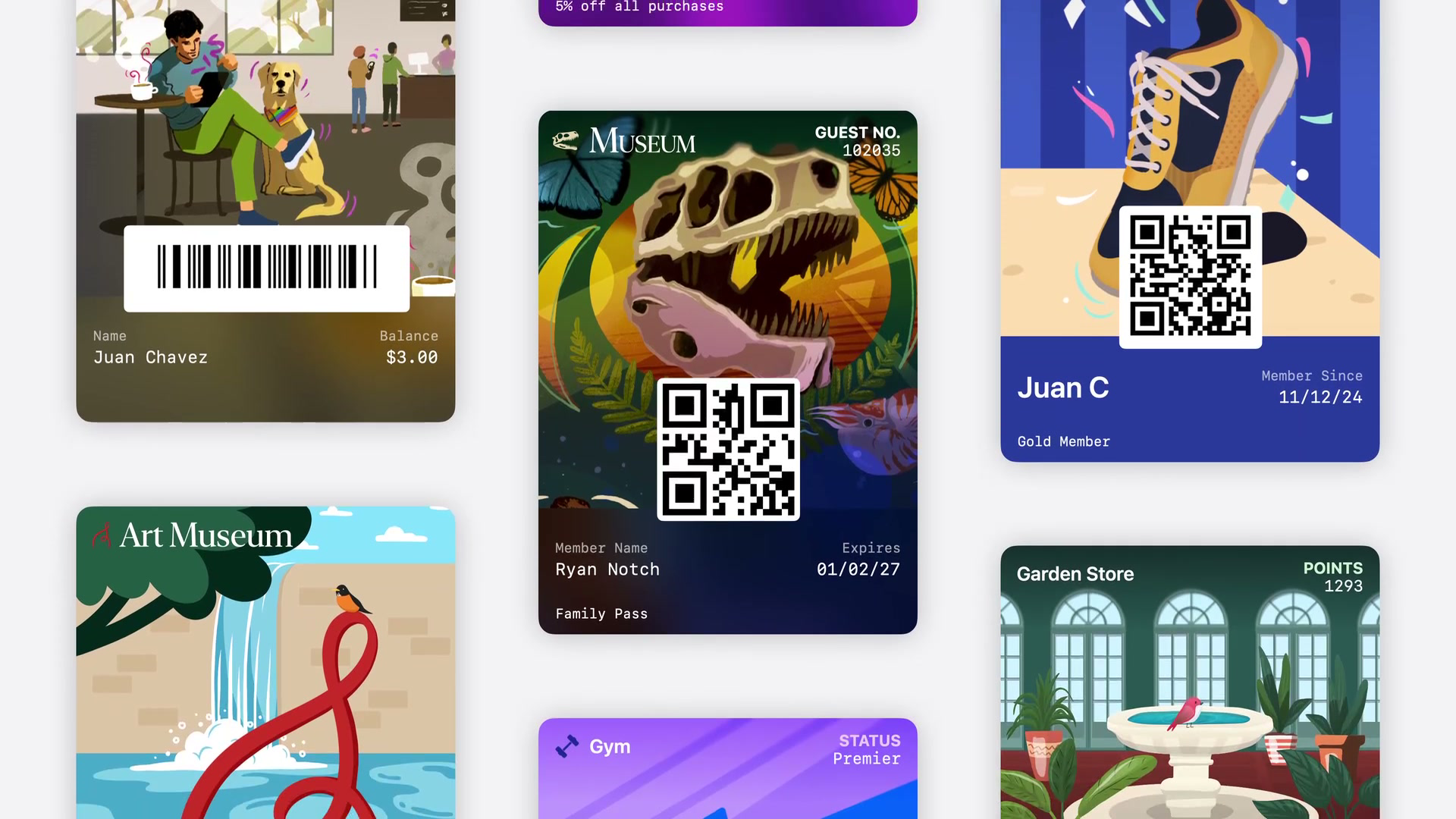
iOS 27 adds Poster Generic, a pass style built around a full-bleed background image with a logo, header fields, primary fields, a single footer field, and an optional barcode laid over it. Apple positions it for membership cards, loyalty programs, store cards, and gift cards, anywhere bold artwork should carry the design. It is the visual register that second-generation event tickets introduced, now available to the generic pass category most loyalty and membership programs use. Apple’s own demo from the session shows the intent:
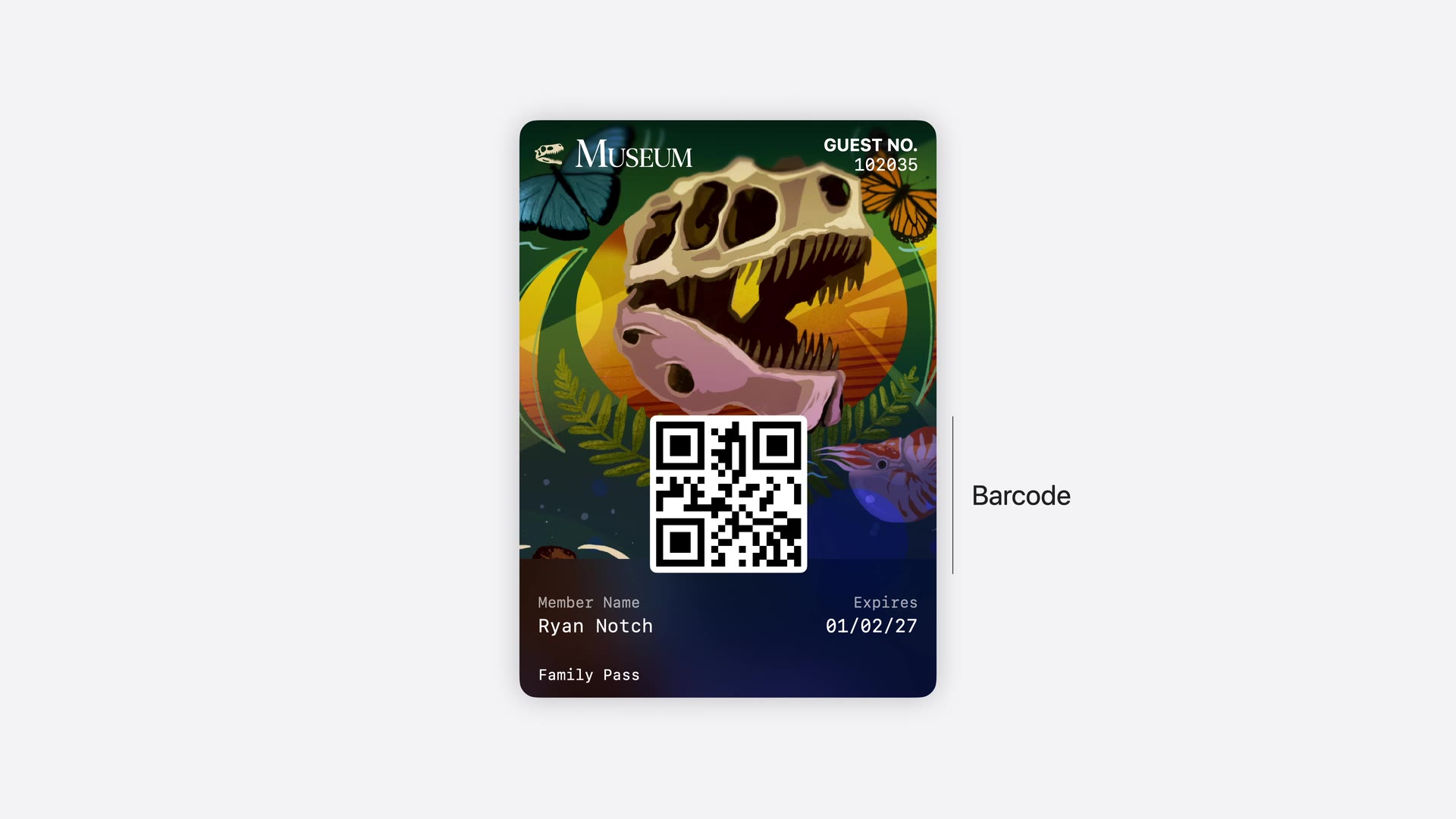
In pass.json it is a new top-level style key:
"posterGeneric": {
  "headerFields": [
    { "key": "memberID", "label": "Member No.", "value": "102035" }
  ],
  "footerFields": [
    { "key": "membershipType", "value": "Family Pass" }
  ]
}
The footer supports exactly one field; additional footer fields are ignored. For devices on iOS 26 and earlier, include both posterGeneric and generic in the same pass.json and older devices fall back to the classic layout. WalletWallet generates that pair from a single backgroundURL; how poster passes work across iOS versions and on Google Wallet.
Four new barcode formats
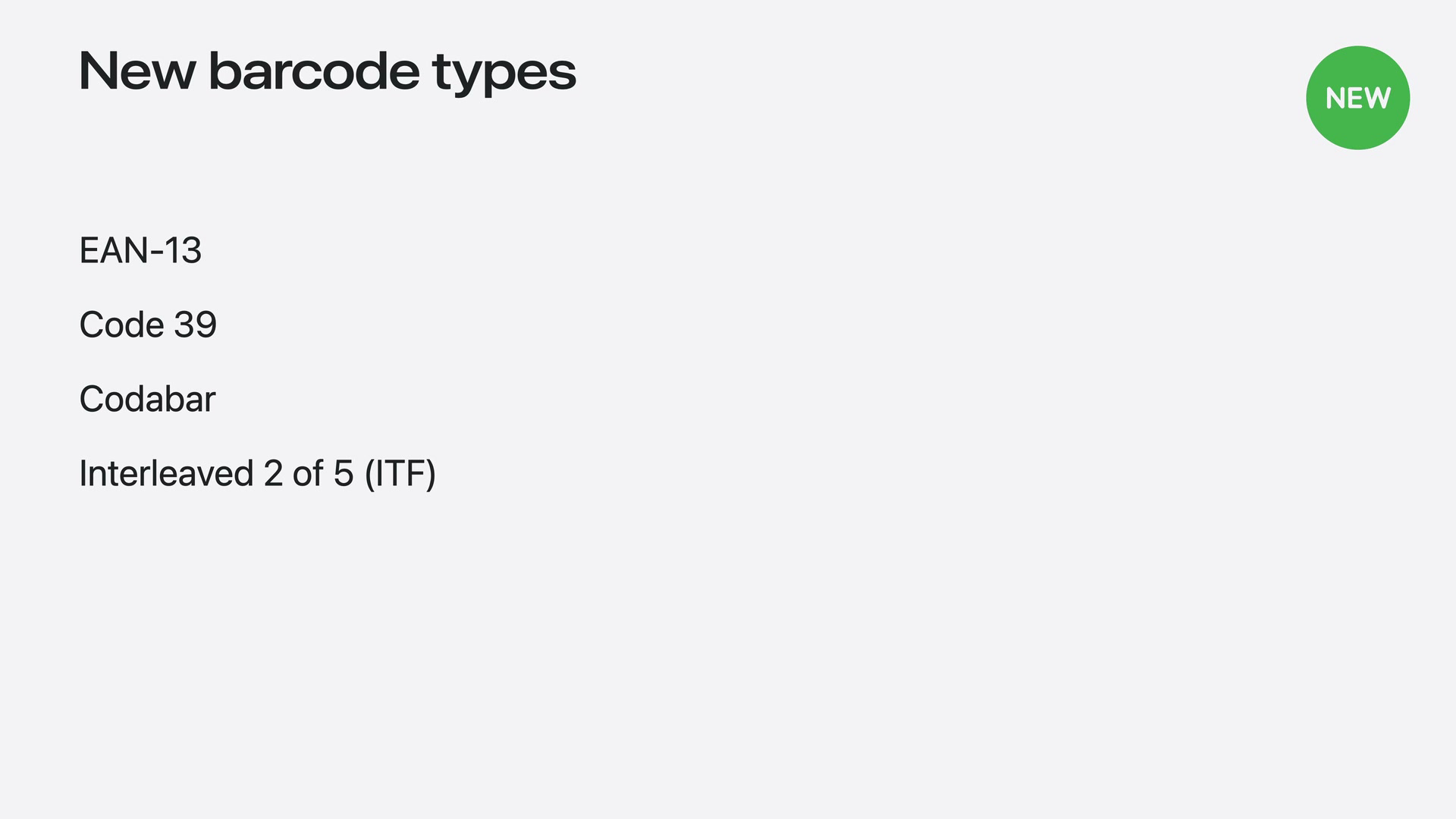
PassKit’s barcodes array has supported QR, PDF417, Aztec, and Code 128 since the early Wallet years. iOS 27 adds EAN-13, Code 39, Codabar, and ITF (Interleaved 2 of 5). These are the symbologies that retail POS scanners, library systems, and legacy ticketing hardware already read, so a loyalty number that lives as an EAN-13 in the plastic-card world can now render natively on the pass instead of being re-encoded as a QR the scanner can’t read.
Barcodes are listed in priority order, so the compatibility strategy is to put the new format first and a QR fallback after it for iOS 26 and earlier:
"barcodes": [
  { "format": "PKBarcodeFormatCodabar", "message": "123456789", "messageEncoding": "iso-8859-1" },
  { "format": "PKBarcodeFormatQR", "message": "123456789", "messageEncoding": "iso-8859-1" }
]
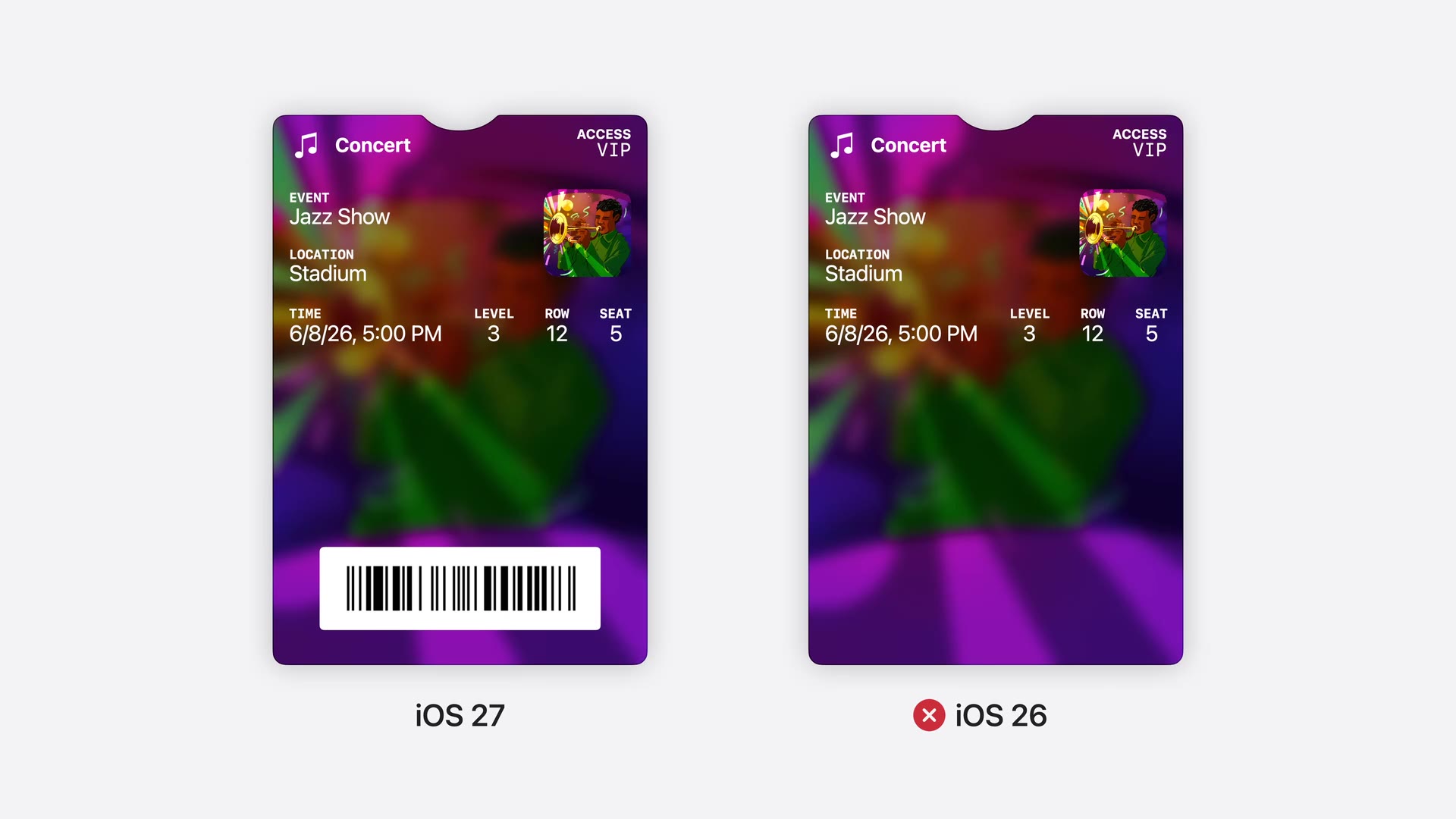
If the scan hardware reads only the new format, Apple’s guidance is to also surface the credential number in a header or primary field for manual entry on older devices. The session shows what skipping the fallback costs: the same ticket renders its barcode on iOS 27 and shows nothing on iOS 26.
Before shipping a new-format pass, check the displayed barcode format and value on each supported iOS version.
Featured Actions on every pass
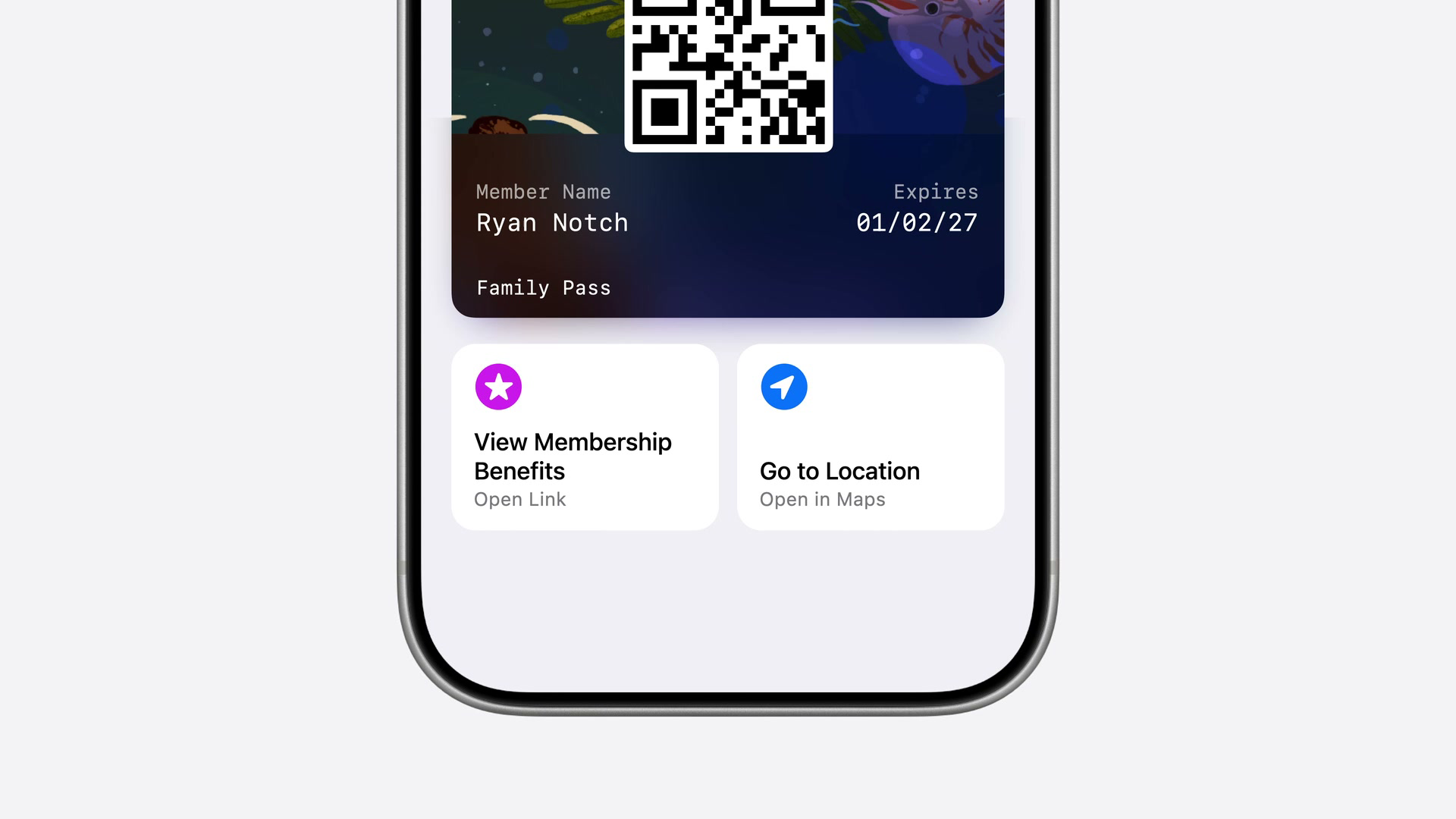
Second-generation event tickets had action buttons; iOS 27 opens them to every pass style through a top-level featuredActions key. Up to two tiles render under the pass face, each with an identifier, one of Apple’s 14 published action types, and a destination. Our complete Featured Actions guide shows every type, icon, recommended use, and implementation detail.
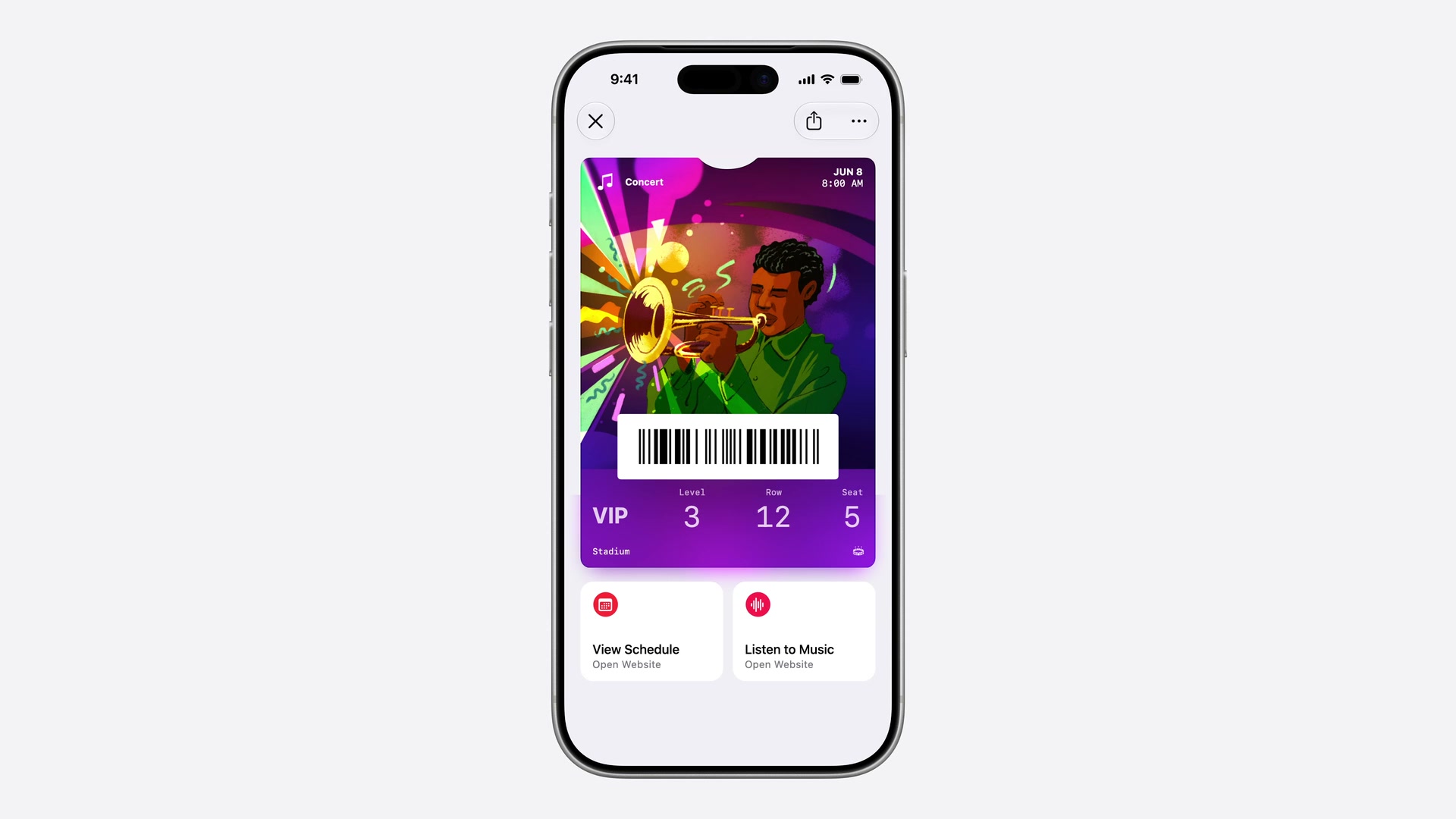
For issuers this is the first time a pass can carry a call to action without burying a URL in a back field. A loyalty card can link straight to rewards, while an updatable membership card can change its supported actions as the member’s needs change.
Pass Designer and Pass Builder: Apple’s first-party tooling
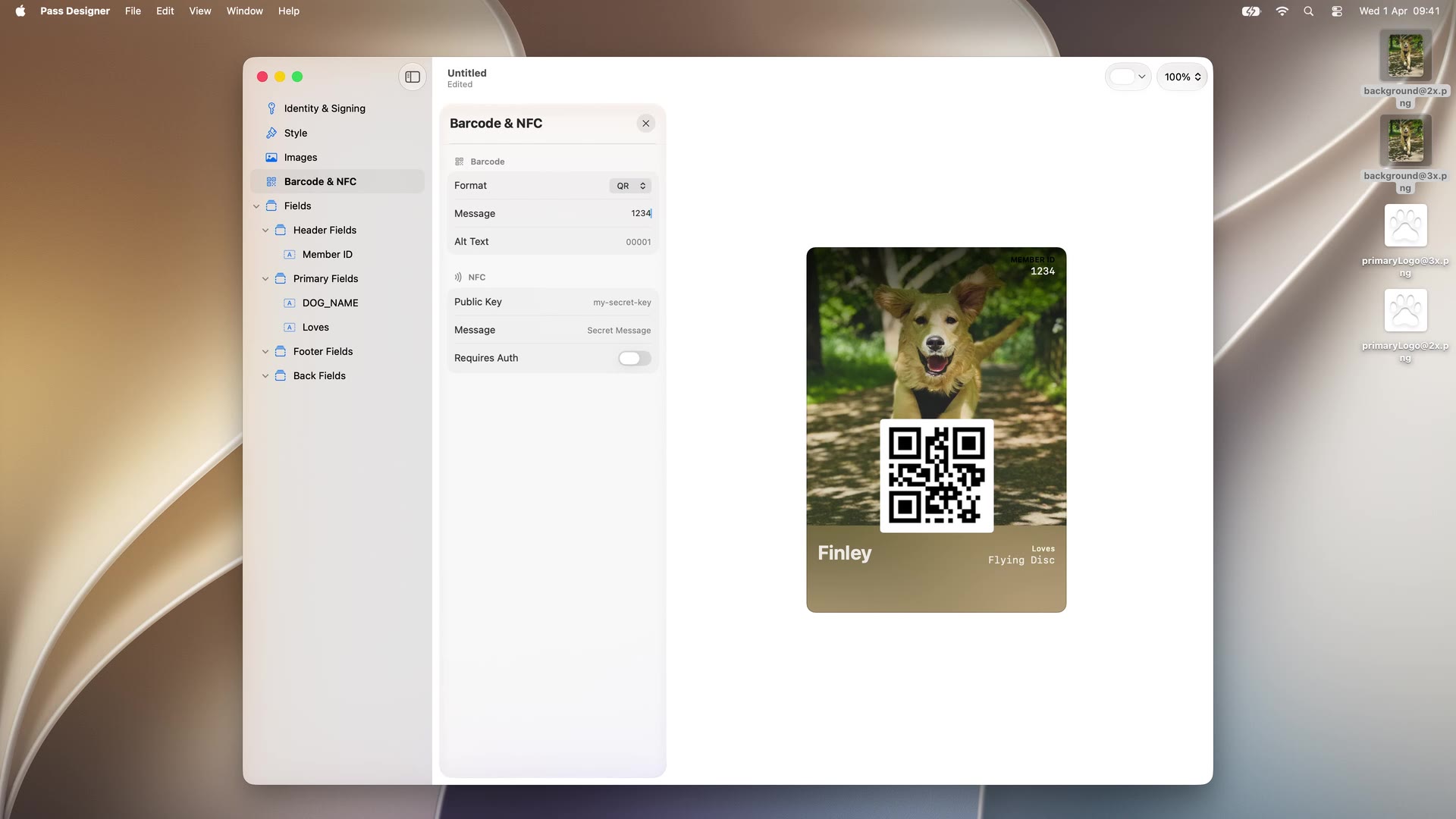
The biggest structural change in the session is that Apple now ships tooling for making passes.
Pass Designer is a new Mac app (macOS 27) for designing pass templates. It is a WYSIWYG editor with a true-to-iOS live preview, covering pass identity and signing configuration, pass style selection (including Poster Generic), images, fields, barcodes, NFC, and semantic tags. Templates save as .pkpasstemplate files, starting from Apple-provided templates or from scratch. We profile the app in detail in our Pass Designer overview.
Pass Builder is the distribution half: a Swift on Server package that turns a .pkpasstemplate plus per-customer values into a personalized, signed .pkpass. It runs on Mac and Linux, exposes a type-safe Swift API and a buildpass command-line executable, and reaches other stacks through generated Java bindings and protobuf definitions of the template format.
What this changes: until now, designing a pass meant hand-editing pass.json against documentation and eyeballing the result on a device, and signing meant assembling your own manifest-and-PKCS#7 pipeline or pulling in a third-party library. Apple just made the design step visual and the sign step a package.
What it does not change: Pass Builder signs with your certificate, so the Apple Developer account, the pass type ID, and the certificate lifecycle are still yours to manage, and it runs on your server. The pieces around it are also still yours: hosting the Apple web service endpoints for pass updates, APNs pushes, pass storage, analytics, and the entire Google Wallet side, which the tools do not touch. The floor for do-it-yourself Apple pass issuance dropped; the operational surface of a two-platform pass program did not.
A roadmap note from us: WalletWallet will support .pkpasstemplate uploads. Design the pass in Pass Designer, upload the template once, and issue from it through the same one-call API that already handles signing, updates, push, and the Google Wallet side. We will also support Featured Actions on passes issued through the API; of everything in this batch it is the addition we are happiest about, since a tappable action on the pass face is what loyalty and membership issuers have asked us for most.
Side by side: iOS 27 Wallet vs Google Wallet I/O 2026
| Wallet area | iOS 27 (announced June 8) | Google Wallet I/O 2026 (May 22) |
|---|---|---|
| Pass authoring | Create a Pass, consumer, scan or scratch-built (in beta, unannounced on stage) | None new. User-add-from-photo predates this cycle |
| AI inside Wallet | Visual intelligence: scan-to-create passes, Split Bill receipt parsing | None. Gemini features inside Wallet UI were not announced at I/O |
| Receipts | Split Bill scans receipts to divide payment; no receipts-into-Wallet API | Digital Receipts API (preview) |
| Loyalty acquisition | Tap to Share at the checkout tap | Contactless loyalty enrollment post-tap |
| Boarding passes | Wallet-native Live Activities already shipped in iOS 26 | Auto-linked Passes (Azul launch partner), inline FF signup |
| Live updates | Already in iOS 26 (boarding passes) | Live Updates for flights and tickets |
| Identity / verification | No new Verify with Wallet announcements | Digital ID expanded to Uber, Intuit TurboTax |
| Geofencing | No change | 10-location cap removed via Maps |
| Wallet app UI | Redesigned Apple Pay checkout sheet, hotel-key concierge, new icon | Android Wallet redesign |
| Cross-platform payment auth | Checkout redesign; nothing cross-device | Cross-device Payment Verification |
| Issuer-side APIs | Poster Generic, 4 new barcode formats, Featured Actions, Pass Designer + Pass Builder | New API surface across receipts, loyalty, auto-link |
The two platforms did different work this cycle. Google built distribution pipes: push a receipt into Wallet, install a loyalty card after a tap, auto-install a boarding pass after check-in. Apple invested in the pass itself: a richer style, more barcode symbologies, native actions, and tooling that lowers the cost of producing a well-made signed pass. Both put loyalty into the tap-to-pay moment.
How this lands for different kinds of business
The cohorts below are the ones we see most often at WalletWallet, with the named examples as illustrative shapes.
Multi-location retailer with its own loyalty program
What lands hardest: the tap-to-pay moment is now a loyalty surface on both platforms. Google’s contactless loyalty enrollment prompts the customer to join after paying; Apple’s Tap to Share hands the merchant loyalty details during the same tap. Both require a live, native wallet loyalty program to participate. The new barcode formats matter here too: if your POS scanners read EAN-13 or Code 39 from plastic cards, the iOS 27 pass can now carry the same symbology natively instead of forcing a QR retrofit. Create a Pass raises the visual bar your own pass is measured against, and Poster Generic is the tool for clearing it: full-bleed brand artwork with server-updating fields and lock-screen notifications when balances change. Our own pass-shape data backs the design point: across the passes generated through WalletWallet in the last 30 days, 33% carry a custom brand color and around 1.2 secondary fields on average. The field is settling on simple, branded designs, and live behavior is what distinguishes a real loyalty pass from a placeholder.
What to do now: if you don’t issue native Google Wallet loyalty (only .pkpass), the cost of not doing so just rose. Audit your Apple Wallet design against what a hand-built pass will look like in September, and plan the Poster Generic upgrade with a generic fallback.
Membership or discount-card operator (where the card scheme is the product)
What lands hardest: this cohort is who Poster Generic is for. Apple’s own pitch for the style is membership and loyalty cards where artwork carries the brand. Pair it with Featured Actions: a View Membership Benefits tile can stay year-round while a second supported action changes with the member’s current needs. Create a Pass still has the longest tail here, since the wallet card is the product and the differentiator post-September is the live behavior of an issued pass: updates when a member’s status changes, surfaces on the lock screen near partner venues, redesigns when you refresh the program. Geofence cap removal (Google) is operationally useful for any scheme with more than 10 partner venues.
What to do now: plan the Poster Generic redesign of your card (full-bleed program artwork, generic fallback for older devices) and decide which two supported Featured Actions your members need. Both arrive with the public iOS 27 release; a card designed against the beta is ready on day one.
Single-site venue, gym, or hospitality business
What lands hardest: contactless loyalty enrollment and Tap to Share are the obvious wins for any venue that does tap-to-pay and runs even a basic membership or stamp scheme. Create a Pass is in beta now, which sharpens the specific risk: if your gym hands out a QR code but doesn’t issue a real wallet pass, members will make their own from September, and that copy won’t update when class times change. Live Updates are useful for anything time-bound (a class moving, a venue closing early, a season-ticket schedule change).
What to do now: if you’re not issuing wallet membership passes, the cost of not doing so has gone up, because a member-made copy will be stale within days of any schedule or price change.
Event and live-marketing agency
What lands hardest: Live Updates for tickets is the pro-grade ticketing experience that PDFs and basic passes can’t match. A wallet ticket whose seat updates and whose lock screen surfaces a “doors at 7pm” reminder is operationally distinct. Poster Generic brings the full-bleed treatment that used to be exclusive to second-generation event tickets into the membership and credential passes agencies build for sponsors, VIPs, and speakers, and Pass Designer is useful for client pitches: a true-to-iOS mockup of a branded pass in an afternoon. Auto-linked Passes is worth watching: when post-purchase auto-install extends from airlines to ticketing, agencies issuing through APIs that map cleanly to Google’s class model will inherit it without code changes.
What to do now: spec the fall-season ticket against iOS 27 now: Poster Generic artwork for the event, a featured action for the schedule or venue directions, and Live Updates on the Google side for anything time-bound. Events after September will render on both.
Web or dev agency adding wallet passes to client stacks
What lands hardest: the May-June 2026 cycle made wallet passes more visible to your clients. “Can we add an Apple Wallet pass to the checkout?” becomes a normal client question, which means a pre-built wallet-pass module is a small, repeatable line item. Create a Pass does the educational work that used to be your job. Pass Designer and Pass Builder lower the cost of the Apple-only, build-it-yourself route, so the value an agency adds shifts to the parts the tools leave open: the update web service, push, the Google side, and the integration into the client’s actual system of record. Digital Receipts API is worth tracking for an upsell on top of any e-commerce build.
What to do now: build the wallet-pass module once, against the iOS 27 beta: pass design, the update path, and the Google Wallet side. Client conversations about wallet passes get easier after September, and the module that already handles both platforms is the one that turns those conversations into work.
Indie dev or small SaaS adding wallet as a feature
What lands hardest: market signal. Two major platforms moved on Wallet in the same five weeks, which positions wallet passes as a serious distribution surface for any product that benefits from a phone-resident credential. Create a Pass removes a chunk of explanation from your onboarding. Pass Builder is the new floor for the self-hosted route if you run Swift on a server and want to manage an Apple certificate; a hosted one-call API remains the route that also covers updates, push, and Google Wallet. iOS 26’s Add to Wallet API is the developer-side primitive that pairs naturally with either.
What to do now: ship a minimum version this quarter and iterate through the beta cycle, while the space is still uncrowded.
What stays true regardless of cohort
The pass your business issues remains the source of truth. A self-created pass (Apple Create a Pass) or a user-added-from-photo pass (Google) is a personal shortcut that doesn’t get updates from the operator, so if your cafe replaces its stamp card, a hand-made copy will be wrong the next day. Both platforms made the surrounding context (receipts, enrollment, checkout taps, lock-screen presence) richer, and Apple made the issuer’s pass itself more capable. The signed, server-updatable, branded program at the center is unchanged, and the case for it is stronger than it was at the start of May.
How WalletWallet fits
Disclosure, since this is our blog. WalletWallet is a one-call API for issuing and updating passes on both Apple Wallet and Google Wallet. We sign Apple passes with our certificate and mint Google save links from our own issuer (no Apple Developer or Google issuer account required). POST /api/passes returns a signed .pkpass plus a Save to Google Wallet link. PUT /api/passes/{serial} updates installed passes on both wallets and pushes a notification: APNs for Apple, server push for Google.
iOS 27 Create a Pass is a consumer flow and doesn’t collide with .pkpass issuance from a backend. Apple’s Pass Builder covers the template-to-signed-pass step for teams running their own certificate and their own Swift-capable server; the update web service, push delivery, storage, and the Google Wallet side stay with you, which is exactly the surface a hosted API absorbs. Poster Generic, the new barcode formats, and Featured Actions are pass.json additions, the layer WalletWallet generates. Poster passes and Featured Actions shipped in the editor and the API in September, with a Google Wallet rendering for each. Google’s I/O batch raises the value of native Google Wallet for issuers, which is the surface we already issue to.
Dates to remember
- May 22, 2026. Google I/O Wallet session.
- June 8, 2026. WWDC keynote previews iOS 27. Create a Pass ships quietly in developer beta 1.
- WWDC week, June 8-12, 2026. “What’s new in Wallet” (session 209): Poster Generic, four new barcode formats, Featured Actions, Pass Designer, Pass Builder.
- July 2026 (expected). iOS 27 public beta.
- September 2026 (est.). iOS 27 public release.
Image and source credits: Google Wallet press images via Android Authority, 9to5Google, and Android Police. Apple Wallet reporting from Bloomberg, 9to5Mac, MacRumors, and Apple’s What’s new in Wallet session and Wallet developer page. The iOS 27 session images (the Poster Generic gallery and museum example, the new barcode types slide, the barcode fallback comparison, the Featured Actions tiles and iPhone demo, and the Pass Designer screenshot) are frames from Apple’s session 209 video, © Apple. The Create a Pass screenshots are ours, from the iOS 27 developer beta.
Build your first wallet pass
Turn one JSON request into a pass that installs in Apple Wallet and Google Wallet, with live updates that reach both.