Punch Card Software: How to Build and Run a Complete Program
Learn how punch card software works, plan reward economics, and build the create-to-revoke lifecycle with runnable Node.js and wallet-pass code.
Punch card software keeps a count for each customer, turns that count into a visible card, and moves the customer through a small lifecycle: issue the card, add stamps, make the reward redeemable, reset the card, and revoke it when necessary. The implementation work lies in defining which purchase earns a stamp and keeping every counter, checkout, and customer phone aligned on the current count.
This guide covers both parts. It starts with the program decisions that apply to paper cards, a punch card app, or a point-of-sale add-on. For the customer-facing card, Apple Wallet and Google Wallet are the natural digital default: a customer adds the card from a link or QR code without installing a loyalty app, then the same pass moves from issue to stamp, reward-ready, redemption, reminder, and revocation. The current progress stays together in either wallet app instead of being spread across a dedicated loyalty app and a trail of emails.

In this guide
- Plan the reward and rules
- Compare implementation approaches
- Why Apple Wallet and Google Wallet fit punch cards
- Try the lifecycle on a laptop
- Know what changes before launch
- Measure the program
How punch card software works
Every punch card program has two layers:
- The program record stores the customer ID, stamp count, reward status, redemption history, and the events that changed them. This is the source of truth.
- The customer-facing card shows the useful part of that record:
7 / 8, the reward, the customer’s name, and a barcode staff can scan.
A paper card combines both layers in one object. The holes are the record and the display. Software separates them so a sale can update the record and then refresh the card on the customer’s phone.
The full lifecycle is short enough to write down before choosing a tool:
| State | What happened | What the customer sees | What staff can do |
|---|---|---|---|
| Issued | Customer joined | 0 / 8 and the reward rule |
Find or scan the card |
| Active | A qualifying purchase landed | New count and distance to reward | Add the next valid stamp |
| Reward ready | Count reached the goal | A clear reward-ready state | Redeem once |
| Reset | Reward was redeemed | The same card starts at zero | Begin the next cycle |
| Inactive | No visit within your chosen window | The current count, plus an optional reminder | Continue normally |
| Revoked | Card was cancelled, replaced, or abused | An invalid or expired card | Refuse further stamps and rewards |
The phone pass is a view of the program, not the program itself. If somebody deletes a pass, changes phones, or installs the same card twice, your database still knows how many stamps exist and whether the reward has already been used.
When a punch card is the right loyalty model
Punch cards work best when the qualifying action is easy to explain in one sentence: buy a coffee, attend a class, wash the car, see a film, or book a standard service. The customer can look at the card and know what the next visit does.
Use a points program when purchase values vary enough that one visit should not equal another. A restaurant where checks range from $8 to $150 may prefer points per dollar. A coffee shop selling a fairly consistent product can often use a stamp. If you need balances, tiers, or cashback, start with a digital loyalty card rather than forcing those rules into a punch counter.
Visible progress can matter. In a field experiment at a car wash, Joseph Nunes and Xavier Drèze gave one group an eight-stamp card and another a ten-stamp card with two stamps already filled. Both groups still needed eight paid visits, but 34 percent of the endowed group completed the card, compared with 19 percent of the group that started with an empty card. The researchers called this the endowed progress effect in the Journal of Consumer Research (2006). That result supports making progress clear and testing a genuine welcome stamp. It does not show that digital cards outperform paper cards, and a free starting stamp still has to fit your economics.
Delivering the card through Apple Wallet and Google Wallet is useful because customers already use their phones at the counter. In the Reserve Bank of Australia’s 2025 Consumer Payments Survey, 43 percent of roughly 1,200 participants used a mobile device for a contactless payment during their seven-day diary, up from 35 percent in 2022. The figure is about Australian payments rather than loyalty-pass adoption, but it shows how normal the phone-at-checkout behavior has become (RBA, 2026). Apple documents that loyalty passes can update balances and offers, show lock-screen alerts, and be distributed by web, email, SMS, NFC, or QR code (Apple Developer). Google also expanded access to digital passes in Google Wallet to 50 additional countries in 2025, including places where tap-to-pay was not available (Google).
Design the program before writing code
Write a one-page rule sheet first. It will expose most bad programs before they reach a customer.
Define the qualifying action
Specify the product, minimum spend, channel, and exclusions. “One stamp per drink” leaves questions about two drinks in one order, discounted drinks, and delivery orders. “One stamp for each full-price coffee, maximum two per order” is much easier to implement consistently.
Decide where the event comes from:
- a staff member scans the card and taps Add stamp;
- the point of sale sends a paid-order webhook;
- an online checkout confirms payment; or
- a scheduled import reconciles yesterday’s sales.
The event should be verifiable. A customer opening a page on their own phone should never be enough to award a stamp.
Choose the goal and reward
Use a reward customers can understand and staff can fulfill without a policy debate, such as “Buy eight coffees, get the next regular coffee free,” rather than a vague promise such as “Earn special benefits.”
A simple reward-cost check is:
reward burden = direct cost of reward / contribution from qualifying purchasesSuppose a coffee contributes $3 after its direct costs, eight paid coffees are
required, and the free coffee costs the shop $1.10 to make. The direct reward
burden is $1.10 / ($3 × 8), or about 4.6 percent of the contribution from the
qualifying purchases. This is an illustration, not a forecast: use your own
costs, include staff and platform expense where relevant, and remember that
some qualifying visits would have happened without the program.
Set the operating rules
Decide these before launch:
- whether a welcome stamp is earned, gifted, or omitted;
- whether stamps or rewards expire, and how that is disclosed;
- whether one order can earn more than one stamp;
- who can correct a mistaken stamp;
- whether a full card stops earning until the reward is redeemed;
- what staff must check at redemption;
- how a lost, shared, or duplicated card is replaced; and
- how often an inactive customer may receive a reminder.
Then pick the measures you will review. Enrollment rate, first-stamp activation, card completion, median time to reward, redemption rate, repeat interval, reward cost, and inactive-card recovery are more useful than the number of cards issued on its own.
Choose how to implement it
The right punch card software depends on how busy the counter is and what must trigger a stamp.
| Approach | Setup | Customer friction | Integration and control | Best fit |
|---|---|---|---|---|
| Paper card | Minutes | Carry another card | Manual, limited audit trail | A small pilot with one counter |
| No-code punch card app | Hours | Often a web signup or separate app | Vendor workflows and dashboard | A merchant that wants no development |
| Apple Wallet or Google Wallet pass | Hours to days | Add once from a link or QR; no separate loyalty app | Issue, stamp, reward, reset, remind, and revoke through one card | The default digital card for most programs |
| POS loyalty module | Days | Usually tied to phone number or account | Strong checkout connection, vendor rules | One POS across all locations |
| Custom mobile app | Weeks to months | Install and keep another app | Maximum product control | A broader app customers already use |
Why Apple Wallet and Google Wallet fit digital punch cards
Unless customers already use your app for something broader, start with an Apple Wallet or Google Wallet pass. It gives the program the useful lifecycle of an app—live progress, reward state, reminders, and revocation—without asking for a dedicated loyalty-app install. Email or SMS can deliver and recover the add link, while the installed pass remains the quieter, current home for the card at the counter.
The pass does not replace the database, staff screen, or POS integration that decides when a stamp is valid. It gives that system a customer-facing layer that is easier to adopt and harder to lose in an inbox.
Architecture for a digital punch card program
The example uses WalletWallet’s digital punch-card delivery for Apple Wallet and Google Wallet. WalletWallet signs and hosts the passes and pushes changes to both wallets. Your program still owns the loyalty rules.
The smallest useful architecture has four pieces:
- A customer and card record. It contains a stable member ID, count, status, and pass serial number.
- A qualifying event. A staff action or paid-order webhook asks for one stamp.
- An authenticated backend. It validates the event, changes the record, and calls the pass API. The API key never reaches the customer browser.
- A wallet pass. It shows the new count and carries the member ID in a barcode for staff to scan.
The barcode is an identifier, not authorization. A screenshot can copy a QR
code, so scanning PUNCH-123 should only find the record. A signed-in staff
action, valid sale, and current reward state determine whether anything changes.
Try the lifecycle on your laptop
This optional example lets you try the complete lifecycle without deploying an
application or setting up a database. It stores test records in cards.json on
your computer and calls WalletWallet when a card is created or changed. You can
skip the code and still use the planning and operating guidance in this article.
To follow along, install Node.js 22 or newer, use any text editor, and get a WalletWallet API key from signup.
1. Set up the example
Run:
mkdir wallet-punch-card
cd wallet-punch-card
Create a file named .env and put your key in it. Do not add quotes or share
this file:
WALLETWALLET_API_KEY=ww_live_replace_with_your_keyCreate a .gitignore file with the following two lines so the API key and local
customer records are not committed:
.env
cards.json
Create punch-card.mjs and paste in the program below. The full listing starts
collapsed so it does not interrupt the guide; expand it when you are ready to
copy the file.
import { randomUUID } from "node:crypto";
import { readFile, writeFile } from "node:fs/promises";

const API_BASE = "https://api.walletwallet.dev";
const API_KEY = process.env.WALLETWALLET_API_KEY;
const DB_FILE = new URL("./cards.json", import.meta.url);
const GOAL = 8;

if (!API_KEY) {
  throw new Error("Add WALLETWALLET_API_KEY to .env first.");
}

async function loadCards() {
  try {
    return JSON.parse(await readFile(DB_FILE, "utf8"));
  } catch (error) {
    if (error.code === "ENOENT") return {};
    throw error;
  }
}

async function saveCards(cards) {
  await writeFile(DB_FILE, `${JSON.stringify(cards, null, 2)}\n`);
}

async function walletRequest(path, method, body) {
  const response = await fetch(`${API_BASE}${path}`, {
    method,
    headers: {
      Authorization: `Bearer ${API_KEY}`,
      ...(body ? { "Content-Type": "application/json" } : {}),
    },
    ...(body ? { body: JSON.stringify(body) } : {}),
  });

  const text = await response.text();
  let data;
  try {
    data = text ? JSON.parse(text) : {};
  } catch {
    data = { message: text };
  }

  if (!response.ok) {
    throw new Error(`${method} ${path} failed (${response.status}): ${JSON.stringify(data)}`);
  }

  return data;
}

function normaliseEmail(value = "") {
  const email = value.trim().toLowerCase();
  if (!email.includes("@")) throw new Error("Use a valid customer email.");
  return email;
}

function statusFor(card) {
  if (card.stamps >= GOAL) return "Reward ready";
  if (card.stamps === 0) return "New card";
  const remaining = GOAL - card.stamps;
  return `${remaining} ${remaining === 1 ? "visit" : "visits"} to reward`;
}

function passBody(card) {
  return {
    barcodeValue: card.memberId,
    barcodeFormat: "QR",
    logoText: "Bay Roast Coffee",
    organizationName: "Bay Roast Coffee",
    description: "Bay Roast Coffee punch card",
    colorPreset: "green",
    sharingProhibited: true,
    headerFields: [
      { label: "STAMPS", value: `${card.stamps} / ${GOAL}` },
    ],
    primaryFields: [
      {
        label: "REWARD",
        value: card.stamps >= GOAL ? "Coffee on us" : `Free coffee at ${GOAL}`,
      },
    ],
    secondaryFields: [
      { label: "NAME", value: card.name },
      { label: "STATUS", value: statusFor(card) },
    ],
    backFields: [
      {
        label: "How it works",
        value: `Earn one stamp per full-price coffee. Redeem at ${GOAL}.`,
      },
      {
        label: "Notifications",
        value: card.notification,
        changeMessage: "%@",
      },
    ],
  };
}

function stampMessage(stamps) {
  if (stamps >= GOAL) return "Reward ready: your next coffee is on us.";
  const remaining = GOAL - stamps;
  const next = remaining === 1
    ? "One more visit for a free coffee."
    : `${remaining} more visits for a free coffee.`;
  return `${stamps} of ${GOAL}. ${next}`;
}

function getLiveCard(cards, email) {
  const card = cards[email];
  if (!card) throw new Error(`No card found for ${email}.`);
  if (card.revokedAt) throw new Error(`The card for ${email} is revoked.`);
  return card;
}

async function updateCard(card) {
  return walletRequest(
    `/api/passes/${encodeURIComponent(card.serialNumber)}`,
    "PUT",
    passBody(card),
  );
}

async function create(cards, email, name) {
  if (!name) throw new Error("Add the customer's name after their email.");
  if (cards[email]) {
    throw new Error(`A record already exists for ${email}; use a linked replacement record.`);
  }

  const card = {
    email,
    name,
    memberId: `PUNCH-${randomUUID()}`,
    stamps: 0,
    rewardsRedeemed: 0,
    notification: "Card ready. 8 visits earn a free coffee.",
    createdAt: new Date().toISOString(),
  };

  const result = await walletRequest("/api/passes", "POST", passBody(card));
  card.serialNumber = result.serialNumber;
  card.shareUrl = result.shareUrl;
  card.googleSaveUrl = result.googleSaveUrl;
  cards[email] = card;
  await saveCards(cards);

  console.log(`Card created for ${name}`);
  console.log(`Send this install link: ${card.shareUrl}`);
}

async function stamp(cards, email) {
  const card = getLiveCard(cards, email);
  if (card.stamps >= GOAL) {
    throw new Error("Reward is already ready. Redeem it before adding a stamp.");
  }

  card.stamps += 1;
  card.notification = stampMessage(card.stamps);
  const result = await updateCard(card);
  await saveCards(cards);

  console.log(`${card.name}: ${card.stamps} / ${GOAL}`);
  console.log(result.unchanged ? "No change was needed." : "Pass updated.");
}

async function redeem(cards, email) {
  const card = getLiveCard(cards, email);
  if (card.stamps < GOAL) {
    throw new Error(`Reward is not ready: ${card.stamps} / ${GOAL}.`);
  }

  card.stamps = 0;
  card.rewardsRedeemed += 1;
  card.notification = "Reward redeemed. A new card has started at 0 of 8.";
  await updateCard(card);
  await saveCards(cards);

  console.log(`Reward redeemed for ${card.name}; the same card is reset.`);
}

async function nudge(cards, email, message) {
  const card = getLiveCard(cards, email);
  if (!message) throw new Error("Add the reminder text after the email.");
  if (message === card.notification) {
    throw new Error("Use different reminder text so the field actually changes.");
  }

  card.notification = message;
  await updateCard(card);
  await saveCards(cards);
  console.log(`Pass update accepted for ${card.name}; wallet delivery is asynchronous.`);
}

async function revoke(cards, email) {
  const card = getLiveCard(cards, email);
  await walletRequest(
    `/api/passes/${encodeURIComponent(card.serialNumber)}`,
    "DELETE",
  );
  card.revokedAt = new Date().toISOString();
  await saveCards(cards);
  console.log(`Card revoked for ${card.name}.`);
}

async function main() {
  const [command, rawEmail, ...rest] = process.argv.slice(2);
  if (!command || !rawEmail) {
    throw new Error(
      "Usage: node --env-file=.env punch-card.mjs <create|stamp|redeem|nudge|revoke|show> <email> [text]",
    );
  }

  const email = normaliseEmail(rawEmail);
  const cards = await loadCards();

  if (command === "create") return create(cards, email, rest.join(" "));
  if (command === "stamp") return stamp(cards, email);
  if (command === "redeem") return redeem(cards, email);
  if (command === "nudge") return nudge(cards, email, rest.join(" "));
  if (command === "revoke") return revoke(cards, email);
  if (command === "show") {
    console.log(JSON.stringify(cards[email] ?? null, null, 2));
    return;
  }

  throw new Error(`Unknown command: ${command}`);
}

main().catch((error) => {
  console.error(error.message);
  process.exitCode = 1;
});
The Notifications back field is created with a useful first value. On later
updates, Apple substitutes the new field value into %@ and can show it on the
lock screen. Google uses a generic update banner and displays the changed
content inside the pass. Keeping this notification field in the same array
position also keeps its identity stable across updates.
2. Create and distribute a card
Run the script from the project directory:
node --env-file=.env punch-card.mjs create sam@example.com "Sam Ortiz"The first run creates cards.json and prints a hosted install link:
Card created for Sam Ortiz
Send this install link: https://pass.walletwallet.dev/p/...
Text or email that link, or turn it into a QR code at the counter. It shows the appropriate Apple Wallet or Google Wallet action for the device. The returned serial number is saved locally because every later update addresses that exact pass.
The POST /api/passes call creates both wallet versions. It returns the serial,
hosted share URL, Google save URL, and a base64-encoded Apple .pkpass; the
API reference documents the full response.
3. Add a stamp
After a qualifying purchase has been verified, run:
node --env-file=.env punch-card.mjs stamp sam@example.comRun it seven times during testing and the card reads 7 / 8. The same pass
updates in place, and the notification says, “7 of 8. One more visit for a free
coffee.” The eighth valid stamp changes the reward field to Coffee on us.
The script sends the entire pass body on each PUT, not just the count. A
WalletWallet update replaces the stored body, so leaving out the name, barcode,
or back fields would remove them from the next pass version. Keep the complete
body in code and change the underlying program record first.
4. Redeem the reward and reset the same card
Once staff confirms the full card and provides the reward, run:
node --env-file=.env punch-card.mjs redeem sam@example.comThe command refuses an incomplete card. A complete card returns to 0 / 8,
increments rewardsRedeemed in the local record, and retains the same serial and
install link. This is the reset step: the customer does not add a new pass after
each reward.
For a prepaid class pack, the same operation can refill the count instead of zeroing it. A ten-class pass might count down from 10 while a visit-based reward counts up to 8. Choose one direction and label it clearly.
5. Nudge an inactive card
A reminder is another update to the pass the customer already holds:
node --env-file=.env punch-card.mjs nudge sam@example.com "You're two visits from a free coffee."The script requires the message to differ from the previous notification because an unchanged update produces no push. Use reminders sparingly, base them on a defined inactivity window, and provide whatever marketing consent or opt-out your jurisdiction requires. The useful nudge refers to real progress; it does not invent urgency.
6. Revoke a cancelled or duplicated card
If a live card was copied, replaced, or used fraudulently, run:
node --env-file=.env punch-card.mjs revoke sam@example.comRevocation is terminal. Apple marks the pass void and removes its usable
barcode; Google moves it to expired passes. Issue a fresh card if the customer
should continue, using a linked replacement record rather than overwriting this
audit history. Hiding Apple’s share button with sharingProhibited: true
reduces casual sharing, but the database and redemption checks still protect the
reward when somebody sends a screenshot.
Add a visual stamp grid with strip images
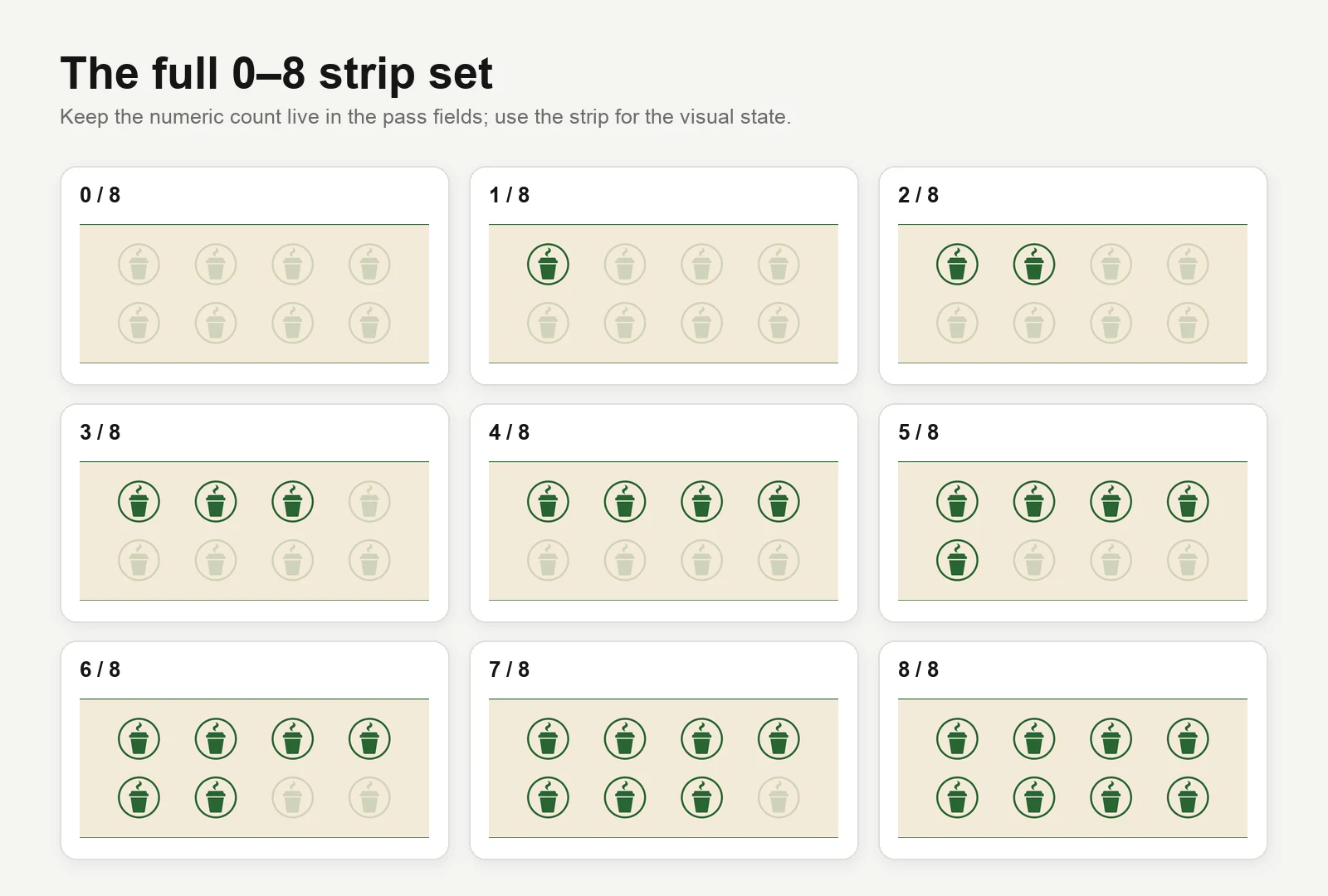
The text count is enough to run the program. If you want the familiar row of filled circles, create one PNG for every possible state:
bay-roast-0-of-8.png
bay-roast-1-of-8.png
...
bay-roast-8-of-8.png
Host them on public HTTPS URLs and add the matching URL inside passBody:
stripURL: `https://example.com/stamps/bay-roast-${card.stamps}-of-8.png`,Include stripURL on the original POST and on every full PUT. It changes the
Apple pass to the store-card style; on Google Wallet, the image appears as a
full-width image lower on the card. Strip images are a Pro field. Keep the text
count and reward fields even when the dots are visible so the state remains
legible to screen readers, in notifications, and when an image fails to load.
The graphic should be generated from the same stored count rather than inspected
and incremented on its own. Two competing counts are an invitation to show
6 / 8 beside seven filled circles.
Before you use this with customers
The laptop example is designed for learning. A live program should connect the same lifecycle to the system where you already trust purchases and customer records. Before launch, make sure that:
- each sale or visit has a unique ID, so a retry cannot add another stamp;
- staff sign in before adding, correcting, redeeming, or revoking a card;
- the API key stays on your server rather than in a browser or mobile app; and
- the program keeps an event history and retries a wallet update if delivery fails.
A developer can implement those safeguards in your POS integration or backend. They do not change the customer experience described above: verify the purchase, update the record once, then refresh the pass the customer already holds.
Measure whether the program works
Review the program by cohort and location, not just in aggregate:
- Enrollment rate: eligible customers who accept a card.
- Activation rate: issued cards that earn a first paid stamp.
- Completion rate: activated cards that reach the reward.
- Time to reward: median days from first stamp to ready.
- Redemption rate: ready rewards that are actually used.
- Repeat interval: days between qualifying visits before and after joining.
- Reward burden: direct reward cost relative to contribution from qualifying sales.
- Inactive-card recovery: nudged customers who make a qualifying visit inside a defined window.
Compare against a reasonable baseline and keep the limitations visible. People who join loyalty programs may already be more frequent customers, so a simple before-and-after chart does not prove the program caused every extra visit. A small pilot across similar locations or staggered launch dates produces more useful evidence.
Common implementation problems
| Symptom | Likely cause | Fix |
|---|---|---|
| One sale adds two stamps | Retried webhook or two staff taps | Put a unique constraint on the sale or check-in event ID |
| Fields disappear after an update | The PUT contained only the changed field |
Rebuild and send the complete pass body every time |
| The reminder does not appear | The notification field was absent on create or its value did not change | Seed it on POST, keep its array position stable, and send new text |
| A customer shares the barcode | A QR code was treated as proof | Use it only to find the record; require an authenticated staff or sale event |
| A reward is redeemed twice | Redemption was not tied to a reward cycle | Store a unique redemption for each card and cycle, then reset atomically |
| Staff find the wrong customer | Email or name is being used as the only ID | Put a stable, non-secret member ID in the barcode and show a confirmation screen |
| The phone shows an older count | The program write succeeded but pass sync failed | Queue a retry and reconcile from the database’s current state |
Punch card software questions
What is punch card software?
It is a loyalty system that records qualifying visits or purchases toward a fixed reward. It usually includes customer records, a staff or POS action for adding stamps, a customer-facing paper or digital card, redemption rules, and a history of changes.
Should a loyalty program use stamps or points?
Use stamps when one qualifying action can have roughly equal value and the rule fits in a sentence. Use points when spend varies, customers redeem different rewards, or the program needs balances and tiers.
Can Apple Wallet or Google Wallet replace a loyalty app?
They can replace the customer-facing card and deliver live count changes without a separate app. They do not replace the program database, POS connection, or staff authorization that decides when a stamp is valid.
How do you prevent fraudulent stamps?
Keep all writes on an authenticated backend, use unique sale or check-in IDs, record the staff or system actor, and make the barcode an identifier rather than permission. Redemption should be an atomic, one-time event for the current reward cycle.
What happens after the reward is redeemed?
Record the redemption, reset or refill the same card, and push the new state to the existing pass. The customer keeps the same install link and does not need a new card for every cycle.
Build the smallest useful version first
Start with one reward, one location, one verified way to add a stamp, and a written redemption rule. Run the complete lifecycle with staff before inviting customers: issue, stamp, fill, redeem, reset, nudge, and revoke. Once those transitions are reliable, connect the POS and add richer reporting.
The code above is enough to test that lifecycle from a laptop. Keep email or SMS for delivery and recovery, with the installed pass as the card customers return to at every visit. When you are ready to brand the pass and operate it at the counter, use the digital punch-card setup and the WalletWallet API documentation alongside your program rules.
Build your first wallet pass
Turn one JSON request into a pass that installs in Apple Wallet and Google Wallet, with live updates that reach both.