How to Send Apple Wallet Pass Notifications with a Custom Message
Apple Wallet has no send-message API: a lock-screen banner appears when a pass field changes. Send any custom message with changeMessage and one PUT, and see how APNs and Google Wallet messages work underneath.
An Apple Wallet pass shows a lock-screen notification when one of its fields
changes value and that field carries a changeMessage. There is no separate
endpoint for sending a message, so to send any text you want, you change a field
whose value is the text.
With WalletWallet that field is the notification property: PUT a new
message whenever you want a banner. Both wallets are handled, and you never
touch APNs or Google’s API.
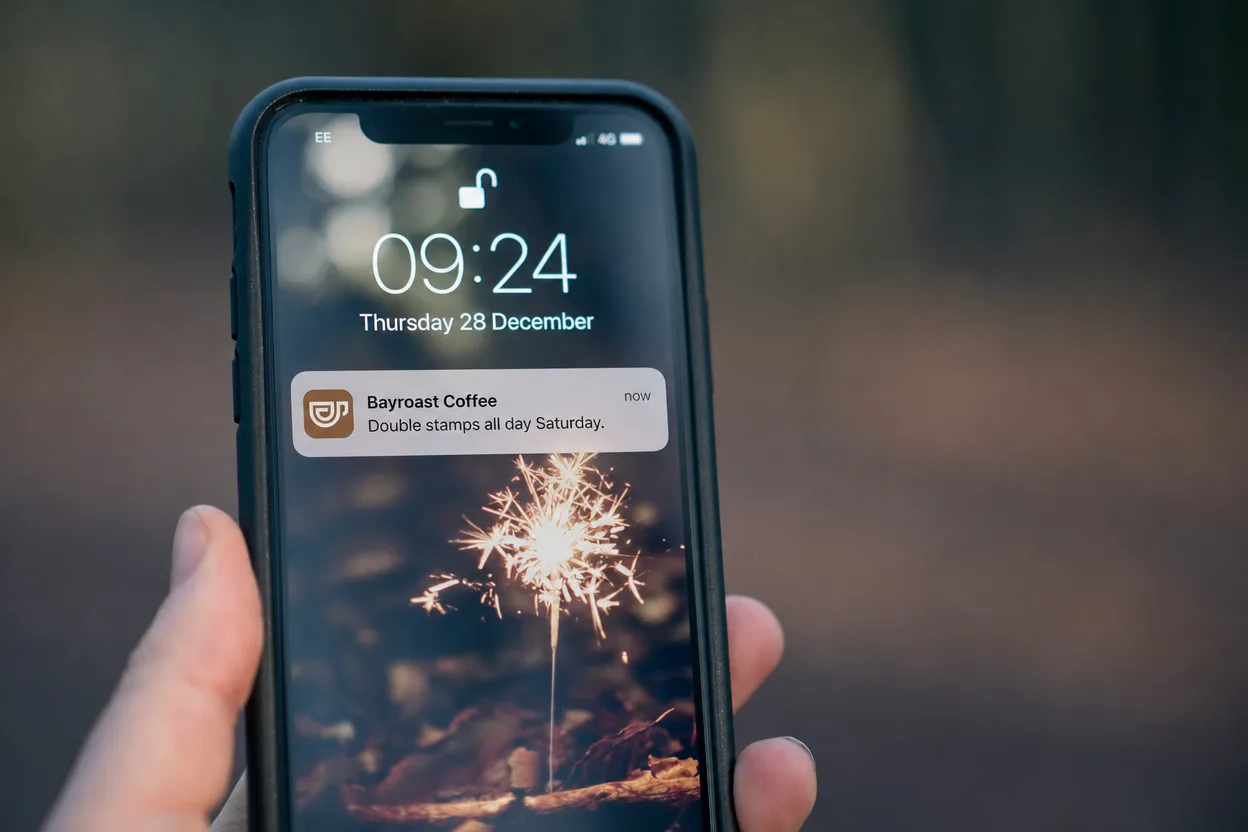
Send a custom message
Create the pass as usual. It needs no message field yet.
curl -X POST https://api.walletwallet.dev/api/passes \
  -H "Authorization: Bearer ww_live_<your_key>" \
  -H "Content-Type: application/json" \
  -d '{
    "organizationName": "Bayroast Coffee",
    "logoText": "Bayroast Coffee",
    "primaryFields": [
      { "label": "Stamps", "value": "3 / 8", "changeMessage": "You have %@ stamps" }
    ],
    "barcodeValue": "BR-0412",
    "barcodeFormat": "QR"
  }'
The response returns a serialNumber. To send a message, PUT the same pass with
notification set to the message:
curl -X PUT https://api.walletwallet.dev/api/passes/<serial> \
  -H "Authorization: Bearer ww_live_<your_key>" \
  -H "Content-Type: application/json" \
  -d '{
    "organizationName": "Bayroast Coffee",
    "logoText": "Bayroast Coffee",
    "primaryFields": [
      { "label": "Stamps", "value": "3 / 8", "changeMessage": "You have %@ stamps" }
    ],
    "barcodeValue": "BR-0412",
    "barcodeFormat": "QR",
    "notification": "Double stamps all day Saturday."
  }'
Every iPhone with the pass installed shows “Double stamps all day Saturday.” on
the lock screen, under the name in organizationName. On Apple the message is a
back field labeled Notifications, with changeMessage "%@", so the banner shows
the text exactly as written. PUT replaces the whole pass, so send every field
each time. The exception is notification: an update that omits it keeps the
current message, and "notification": null removes it.
How Apple decides to show a notification
Apple’s field reference
defines changeMessage as “a format string for the alert text to display when
the pass updates”, and sets three rules:
- The field needs a
changeMessage. “You need to provide a value for the system to show a change notification.” A changed field without one updates silently. - The format string needs
%@, which iOS replaces with the field’s new value."Gate changed to %@"becomes “Gate changed to B12”. - The value has to change. iOS compares the new pass with the one on the device and notifies for fields whose value differs.
That gives you two patterns:
- Templated banners on real fields. Put the
changeMessageon the field that changes:"You have %@ stamps"on a stamp count,"Now at %@"on a gate,"Your balance is %@"on a balance. Updating the count is the notification. - Free-form messages. The
notificationproperty, as in the example above. Any text you send becomes the banner.
Change one notifying field per update. When two fields with a changeMessage
change together, iOS shows one generic “Pass changed” banner with neither text.
Rules for the message field
- Send it alone. Put a message in an update that changes no other field with
a
changeMessage, so the banner shows its text. - Keep
backFieldsin the same order for your own fields with achangeMessage. WalletWallet identifies them by their position in the array, so moving one re-keys it. Thenotificationfield has its own key and never moves. - Vary the text. Sending the same message twice is not a change, so the
second one shows nothing. An identical request body returns
{ "unchanged": true }, fires no push, and doesn’t count against your quota. - Keep it short. The lock screen shows a few lines; put detail in the pass itself, where the message also stays readable on the back of the card.
The Pass Manager sends the same message without code: open the pass, type the message under “Send a notification”, and send.
What happens underneath on Apple
If you run passes on your own infrastructure, this is the chain that a
WalletWallet PUT performs for you. Apple documents it under
updating a pass.
- The pass declares a web service.
pass.jsoncarrieswebServiceURLand anauthenticationToken. Without both, the pass can never update. - The device registers. When someone adds the pass, the device sends
POST /v1/devices/{deviceLibraryIdentifier}/registrations/{passTypeIdentifier}/{serialNumber}with its push token, authenticated withAuthorization: ApplePass <token>. - You push. When the pass changes, send an APNs notification to each
registered push token. The payload is an empty JSON object,
{}. - The device asks what changed. It calls
GET /v1/devices/{deviceLibraryIdentifier}/registrations/{passTypeIdentifier}?passesUpdatedSince={tag}, and you return the serial numbers updated since that tag plus a new tag. - The device downloads the pass. It calls
GET /v1/passes/{passTypeIdentifier}/{serialNumber}and receives the new signed.pkpass. iOS compares field values and shows a banner for each changed field with achangeMessage.
The APNs request has details that trip up most first implementations:
- Authentication: token-based, with a
.p8key from your Apple Developer account signing an ES256 JWT whosekidis the key ID andissis your team ID. - Topic:
apns-topicis the pass type identifier (pass.com.example.loyalty), not an app bundle ID. - Host: pass pushes go to the production host,
api.push.apple.com. - Content: the new
.pkpassmust actually differ in a field value, or the device downloads it and shows nothing.
When passes don’t update, the cause is usually one of those, or the step 4
endpoint returning no serials because the passesUpdatedSince tag isn’t compared
correctly.
Google Wallet
Google Wallet notifies through messages. Adding a message to a pass with the TEXT_AND_NOTIFY type pushes a notification to
everyone who saved it, and the message appears in the pass details. Google allows
3 notifying messages per pass in 24 hours
and returns a quota error past that.
On every PUT, WalletWallet updates the Google pass and adds a message with
TEXT_AND_NOTIFY. The Android notification reads “title was updated”, and
the new content, including your message field, shows inside the pass. Past
Google’s daily limit, we resend the same message as a silent TEXT message, so
the pass still updates without a notification.
Sending well
- Tie each message to the pass. A stamp, a reward, a changed time, or an offer for the holder of that card reads as service. A general promotion reads as spam, and holders can switch notifications off per pass on the back of the card.
- Plan for Google’s cap. Three notifications per pass per day is the ceiling on Android, so batch related changes into one update.
- Say who it’s from.
organizationNameis the banner title, so set it to the business the holder knows.
FAQ
Can I send an Apple Wallet notification without changing the pass?
No. Wallet has no message endpoint; a notification is always the result of a
changed field. The notification property above is the standard way to send any text.
Why didn’t my notification show?
Check, in order: the field has a changeMessage containing %@; its value
differs from the last update; no other field with a changeMessage changed in
the same update; backFields kept its order; and the holder hasn’t turned off
notifications for the pass.
How fast does it arrive?
Devices get the push within seconds of the PUT, then download the new pass.
A phone that is off or offline updates when it reconnects.
Does every message count against my plan?
Each PUT that changes the pass counts as one pass on your plan, on both wallets
together. An identical body is free and sends nothing.
Can I customize the notification on Android?
Google’s notification text is generic. Your message shows inside the pass, in the details view.
To send your first message, create an account, issue a pass, and
PUT it with a notification. The full request reference is in the
docs. For the fields on the pass itself, see the
anatomy of an Apple Wallet pass.
Build, distribute, and notify in under five minutes
Design your passes, hand them out, and send push notifications to Apple Wallet and Google Wallet. By API, from the dashboard, or through an AI assistant.