50 Event Ticket Ideas From Real Events and Venues
Explore 50 event-ticket ideas drawn from real systems, including useful approaches to secure entry, transfer, season access, accessibility, onsite entitlements, and keepsakes.
Digital event tickets can change substantially between purchase and entry. A code may remain hidden until doors approach, a seat or venue can update, a season pass can become the next match, and a transfer can invalidate one credential while creating another. At a festival, the ticket may exchange into access zones, drink entitlements, or a reusable wristband. Afterward, it can become a record of the event rather than disappear.
This review collects 50 ideas from real systems used by events, venues, teams, festivals, theatres, and cultural organizations. Each source has a digital credential that admits a person or controls a ticketed entitlement. Registration apps and generic event pages without a presentable ticket do not count.
For reusable identity or repeat-purchase mechanics, see the companion reviews of loyalty cards and punch cards.
Find the ticket problem you need to solve
- Secure tickets that remain usable
- Transfer, sharing, and group ownership
- Season, multi-day, and complex access
- Tickets that run the onsite experience
- Access, recovery, and what remains afterward
What makes a digital event ticket useful?
- The ticket shows the current event truth. Date, venue, gate, seat, access, owner, and status should update rather than compete with old emails.
- The barcode is an identifier, not the decision. Admission comes from a live or synchronized ticket record and an atomic check-in.
- Ownership changes are explicit. Sending a guest copy, transferring the ticket, and listing it for resale are different operations.
- The exception route is designed. Dead phones, accessibility needs, name lookup, failed transfer, and poor connectivity need a staffed fallback.
Secure tickets that remain usable
-
AXS Mobile ID: rotate the code without requiring a connection at the gate. AXS says its barcode refreshes every 59 seconds and remains usable without Wi-Fi or mobile data (AXS FAQ). Dynamic codes should not turn weak venue connectivity into a new admission failure.
-
DICE: reveal the entry code only when it becomes useful. Tickets are linked to the account and phone number, with the QR code activated on the day of the event (ticket guide). Delayed display reduces the useful lifetime of screenshots.
-
Ticketmaster: put wayfinding on the live ticket. Its updated mobile design pairs rotating codes with tappable directions and clearer entry cues (design announcement). The credential should help a guest reach the correct scanner, not only pass it.
-
Shubert Theatre New Haven: delay the code while showing the event earlier. Accepted tickets appear in the wallet before the secure rotating QR populates at its designated time (digital tickets). The event details can remain reassuringly visible while the admission token stays protected.
-
Paramount Theatre Austin: align barcode release with operations. Its QR code appears one hour before doors open (mobile-ticket guide). A published activation time prevents a hidden code from looking like a broken ticket.
-
U.S. Soccer: make the pre-arrival action explicit. Mobile-only tickets can be saved to Apple Wallet or Google Wallet, and the guide tells fans to do so before reaching the stadium (mobile ticketing). The install prompt belongs in delivery messages and event-day reminders.
-
The O2: explain the moving code before guests try to screenshot it. Its AXS Mobile ID guide describes the changing barcode, transfer, and official resale flow (venue guide). Security behavior needs plain-language onboarding more than a warning at the turnstile.
-
OzTix: offer Wallet as a focused delivery route. The Australian ticket company added Google Wallet to speed access and scanning; Google reports that 40% of Android users saved eligible tickets (case study). Measure save rate separately from delivery and check-in.
-
Philharmonie de Paris: use the pass at institutional scale. The venue implemented a wallet solution for roughly 600,000 annual tickets, with the case study reporting adoption by 35% of spectators (Google Wallet case studies). A wallet route can coexist with other channels while adoption grows.
-
Ticketmaster at the Super Bowl: let one pass serve verification and communication. Google’s partner case studies describe a Wallet solution used for Super Bowl verification and engagement (case-study index). Keep admission state authoritative while using the surrounding pass for timely event information.
Transfer, sharing, and group ownership
-
Ticketmaster Ticket Transfer: invalidate the sender after acceptance. The recipient receives a new valid barcode and the sender’s ticket stops working (transfer guide). Secure transfer changes credential state instead of sending the same image.
-
FIFA World Cup 2026: distinguish full ownership transfer from sending to a guest. A full transfer gives the recipient rights to use, re-transfer, or list the ticket, while the mobile app also supports guest delivery (FIFA guide). Name both operations by the rights they convey.
-
UEFA Mobile Tickets: let a group enter together without unnecessary transfers. The purchaser may keep tickets for guests arriving together and transfer only to someone entering separately (UEFA help). Group delivery should fit the actual arrival pattern.
-
AXS: protect transfer with a one-time verification code. Sending a Mobile ID ticket requires account verification and creates a recipient delivery by email or text (transfer guide). A high-value ownership change deserves stronger authentication than opening the ticket view.
-
DICE Waiting List: return inventory to a controlled queue. A ticket holder who cannot attend can use DICE’s official waiting-list flow rather than circulating the app-bound ticket through an unsupported marketplace (resale and scam guide). A safe exit path makes transfer restrictions more workable.
-
Tottenham Hotspur: reactivate the same season pass. Existing wallet passes are turned back on for the next season, and holders are told not to delete them (digital-ticket guide). Preserve the credential fans already know instead of issuing another pass every year.
-
LiveCloud: let a season holder lend one day rather than the whole pass. Its festival system can split a season pass so Friday access, for example, moves between identity-verified users (platform overview). Share the smallest valid entitlement rather than duplicating a broad credential.
-
Shubert Theatre: put ticket add-ons beside the transferable ticket. Upcoming performances and associated add-ons appear in the same digital wallet and tickets can be sent to a guest. A transfer flow should state whether parking, drinks, or other extras move too.
-
Mirvish Productions: allow secure access without another remembered password. Guests can open the digital wallet with a six-digit email code and receive shared theatre tickets there (ticket FAQ). One-time account access can reduce friction for infrequent recipients.
-
Brentford FC: connect correct assignment to supporter recognition. The club explains that receiving the individual digital ticket helps attendance accrue to the person who uses it (digital-ticket FAQ). Transfer can improve the integrity of both entry and loyalty records.
Season, multi-day, and complex access
-
Apple Wallet season tickets: use one pass for a changing sequence. Apple’s Wallet guidance explicitly supports a single pass representing several events, such as a season ticket (Wallet overview). Update the next event and preserve the durable holder identity.
-
Los Angeles Lakers: keep account choices close to season inventory. The mobile ticket guide covers entry and account management, while season members can direct eligible value toward presales, playoffs, or renewal (team guide). A season-ticket surface can lead to the next ownership decision.
-
FIFA Right-to-Ticket: separate a tradable claim from the final entry credential. A digital collectible can be converted during a defined window into the official app ticket, after which the ticket follows tournament rules (program explanation). A claim, reservation, and entry ticket need visibly different states.
-
Paris 2024: centralize an event portfolio in one official ticket app. The Olympic and Paralympic app let purchasers access and transfer mobile tickets for many venues and sessions (launch announcement). A multi-venue event needs date and place navigation before visual branding.
-
Disney MagicMobile: let one credential span several park interactions. A Wallet pass on iPhone or Apple Watch can admit the guest at participating parks with a contactless tap (Apple guide). A ticket can remain the persistent identity for a multi-day visit instead of becoming a stack of daily codes.
-
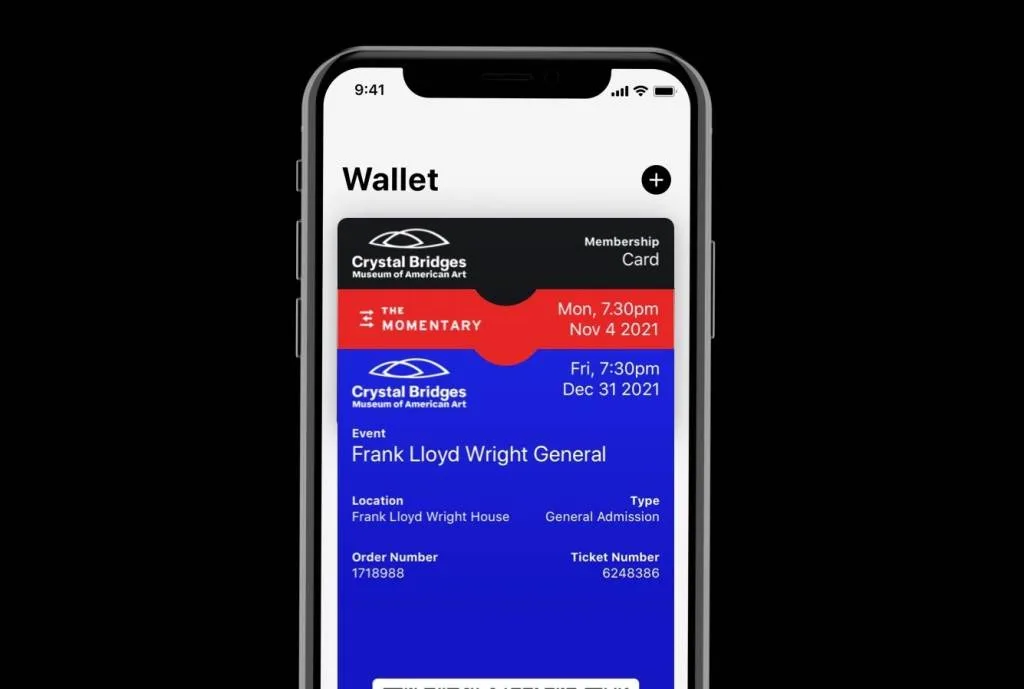
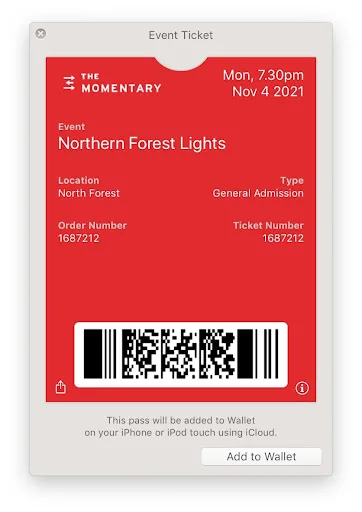
Crystal Bridges and The Momentary: keep different cultural entitlements as separate passes. The deployed work includes event tickets, vouchers, and membership cards delivered to mobile wallets (Substrakt case study). Separate reusable identity from consumable admission and benefits.
-
SXSW: connect a small pass to a much larger schedule product. The festival’s mobile Wallet guest pass worked with SXSW GO, where attendees browse lineups and build personal schedules (customer story). The ticket should link into the rich app rather than attempting to reproduce it.
-
Catalyst’23: make registration hand directly into the attendee app. Ticket emails included a QR route to the conference app, which held the onsite experience and badge flow (Zuddl case study). Delivery can double as orientation when another tool is genuinely required.
-
Cuseum digital tickets: turn single admission into an upgrade path. Its museum ticket product can attach a ticket-to-membership action to the wallet pass (digital tickets). Put the upgrade after the visitor has experienced the institution, with the qualifying ticket value already known.
-
Mirvish Digital Ticket Wallet: group several theatres under one access surface. The wallet covers performances across Mirvish venues while retaining individual event tickets (FAQ). A venue group can share delivery and recovery without flattening event identity.
Tickets that run the onsite experience
- Earl Scruggs Music Festival: preload a VIP benefit on the access credential. NFC wristbands handled entry while VIP drink tokens lived on the same wristband (CrowdPass case study). Keep each entitlement separately countable even when one object carries them.

-
Hickory’s Smokehouse team days: enforce age rules at fulfillment. The QR ticket exchanged into a wristband with food and drink tokens, while the attendee’s registered date of birth controlled alcohol access (case study). Eligibility data should disclose only the decision needed at the bar.
-
Google Holiday Activation: let one wristband control zones and consumption. NFC LED wristbands carried assigned lighting behavior and pre-programmed drink tokens (CrowdPass case study). One credential can coordinate an experience if its separate state machines remain auditable.
-
Windsor Craft Beer Festival: deliver prepaid tasting value at arrival. Ticket buyers received pre-topped-up cashless wristbands rather than buying paper tokens onsite (Weezevent case study). Preloading moves a queue-forming transaction out of the busiest moment.
-
Werchter Boutique: define what happens when the physical credential is lost. The festival exchanges the ticket for a cashless wristband and publishes that an unregistered lost balance cannot be transferred (cashless guide). Recovery rules should be visible before guests load significant value.
-
LiveCloud Beats: keep event money inside the guest account. Festival guests top up a digital currency used at bars and stands, with real-time operational reporting (platform overview). Ticket identity and stored value may share a surface, but cancellation and refund rules should stay distinct.
-
La Marqueta: replace replayable paper drink tickets. NFC wristbands created a controlled tally and reduced multiple redemption (WristCoin case studies). A digital entitlement should become consumed atomically at the serving point.
-
Aniwa Gathering: design for a remote site with intermittent service. Offline vendor terminals recorded wristband transactions and synchronized through the event’s limited connection (WristCoin case studies). Event-day offline behavior must be a system mode, not an improvised exception.
-
Ticketmaster’s mobile ticket actions: put practical links behind the pass. The redesigned ticket can lead to relevant wayfinding and event actions while the primary face stays focused on entry (design overview). Links should change with time and place, not form a permanent menu of every venue service.
-
FIFA Fan ID: let ticket-holder status unlock a separate experience. World Cup 2026 ticket holders can collect an optional physical and digital Fan ID for venue guidance, content, rewards, and personalized memorabilia (program guide). Keep the entry ticket and the optional engagement identity separate so one cannot weaken the other.
Access, recovery, and what remains afterward
-
Ticketmaster accessible and companion tickets: model the relationship between entitlements. The purchase flow distinguishes accessible inventory and companion tickets (accessibility guide). A companion credential should remain linked for service while scanning as a distinct admission.
-
Mirvish Productions: preserve a human fallback. Guests without a mobile device can arrange mailed tickets or box-office pickup (ticket FAQ). Digital-first entry does not require making access conditional on smartphone ownership.
-
DICE Access: let staff find the person when the code fails. Its venue guide tells staff to search the customer list and check the attendee in when a QR cannot be scanned (access guide). Name lookup belongs in a controlled staff tool, not in the public barcode.
-
Disney MagicMobile: support the watch at the point of entry. Guests can present the pass from a paired Apple Watch as well as an iPhone (Apple guide). Keep the essential face concise because smaller devices do not reproduce every ticket detail.
-
Paramount Theatre Austin: keep the wallet reachable from the web. A mobile browser login and one-time access code provide the ticket without requiring a venue app (mobile tickets). Use a dedicated app only when the surrounding experience earns the install.
-
Broadway at The National: allocate scarce tickets through a digital lottery. Winners purchase a limited ticket and receive it in the same mobile account used for standard events (digital lottery). The allocation result should flow into the normal credential and support system.
-
FIFA Right-to-Ticket: publish the conversion deadline as a ticket state. A collectible that is not converted remains a collectible and cannot admit the holder (example drop). A claim should never visually resemble the final entry credential.
-
Kansas City Royals: issue the souvenir only after verified attendance. Eligible holders had to scan the official game ticket before receiving the digital collectible redemption (NFT FAQ). The check-in record can mint a keepsake without making the collectible the security boundary.
-
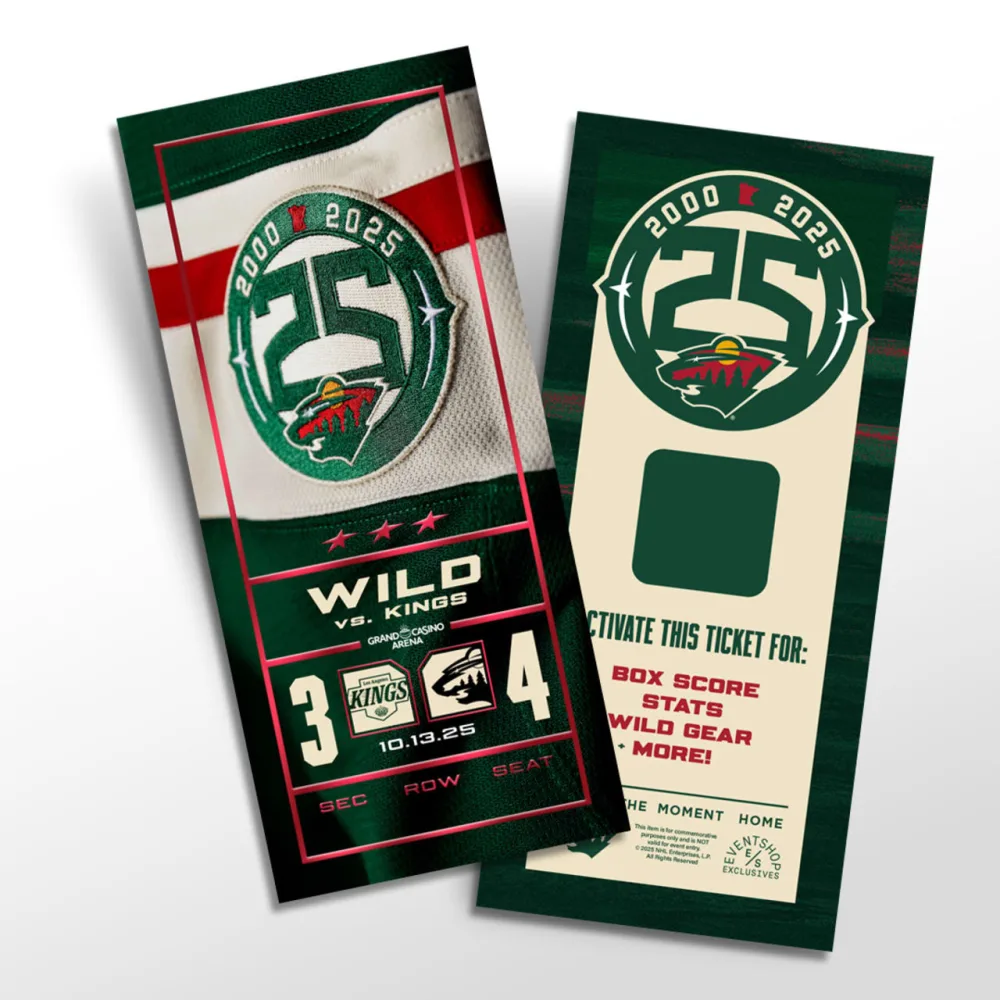
Minnesota Wild: restore the information paper stubs used to preserve. Its collectible tickets include the matchup, score, seat location, and an augmented-reality experience after the game (commemorative tickets). A post-event artifact should use the final event record, not a screenshot of the pre-event pass.

- Humanitix: let the fee model carry a public purpose. The ticketing platform directs profits from booking fees to education and healthcare charities (about Humanitix). The payment receipt and ticket details can explain the contribution without overloading the admission face.
Ten patterns worth borrowing
- Show when a protected barcode will appear and how it works offline.
- Put gate, entrance, seat, and wayfinding close to the code.
- Create a new credential when ownership changes.
- Distinguish guest delivery, transfer, resale, and refund by the rights they move.
- Update a durable season pass rather than issuing one pass per fixture.
- Keep admission, stored value, drink tokens, parking, and VIP access as separate entitlements even when one phone or wristband carries them.
- Design offline scanning and synchronization before choosing the venue network.
- Give staff a controlled lookup and override route.
- Support companion, watch, box-office, and no-smartphone access explicitly.
- Turn verified attendance into a useful follow-up or keepsake without making the souvenir the ticket.
Choose the right ticket format
| Format | Best when | Main tradeoff |
|---|---|---|
| Apple Wallet or Google Wallet ticket | A focused, updateable credential should work without an event app | Complex schedules and networking live elsewhere |
| Ticketing or venue app | Rotating codes, account transfer, resale, or a rich event product are central | Guests must install and authenticate |
| Mobile web wallet | Occasional guests need secure access with little setup | Browser state and connectivity require careful recovery |
| NFC wristband | Fast entry, access zones, or onsite value continue all day | Physical fulfillment and lost-band operations |
| Static PDF or QR | A small event has stable details and a live validation backend | Easy to copy; updates and ownership are weaker |
For most event systems, the database owns the ticket and check-in. A wallet pass is the current guest-facing view, while the barcode carries an opaque ticket ID. The scanner submits that ID, the backend validates the current event and owner, and the first accepted admission is recorded atomically. A screenshot then becomes another presentation of the same already-used ID rather than a second ticket.
For implementation, read the event ticketing software guide or explore the digital event ticket use case.
Frequently asked questions
Should a digital ticket use a static or rotating barcode?
A rotating code can reduce casual screenshot resale, but it adds platform, device, and offline complexity. Static QR, PDF417, Aztec, or Code128 values can still work when the barcode is an opaque identifier and every scan checks the authoritative record. In either case, the admission backend must reject a cancelled, transferred, wrong-event, or already-used ticket.
What happens when a ticket is transferred?
A secure transfer changes ownership in the ticket record, revokes or invalidates the sender’s credential, and issues a current credential to the recipient. Keep an audit trail and publish whether parking, add-ons, loyalty credit, and resale rights move with it. Forwarding an email or screenshot is not a transfer.
Can one phone hold tickets for a group?
Yes, especially when everyone arrives together. Each attendee should still have a separate ticket ID and scan state. If guests may arrive independently, give the purchaser a transfer or guest-send flow before the event rather than asking door staff to split an order in the queue.
What should staff do when a phone is unavailable?
Route the guest to an exception desk with account or name lookup, identity checks appropriate to the event, and a recorded override or replacement flow. Keep the main scan line focused on normal admission. Publish the no-smartphone and dead- phone route before event day so accessibility does not depend on negotiation at the gate.
Build your first wallet pass
Turn one JSON request into a pass that installs in Apple Wallet and Google Wallet, with live updates that reach both.